
2026-06-15 Author : ZCS
Most cafe owners spend weeks evaluating POS software — comparing loyalty program integrations, monthly subscription tiers, and reporting dashboards. Hardware, by contrast, is treated as an afterthought: whatever the software vendor bundles in, or whatever fits the budget after the SaaS contract is signed. That calculus deserves scrutiny.
During a 90-minute morning rush, a lagging touchscreen, a printer that jams on 58mm paper, or a terminal too wide for the espresso bar will cost more in lost throughput and staff frustration than any feature gap in the software layer. This guide focuses exclusively on the hardware decision framework for coffee shop point of sale environments — not which app to run, but what physical components to put on the counter, how to evaluate them, and how those decisions differ between an independent owner running one location and a chain buyer standardizing across 50.
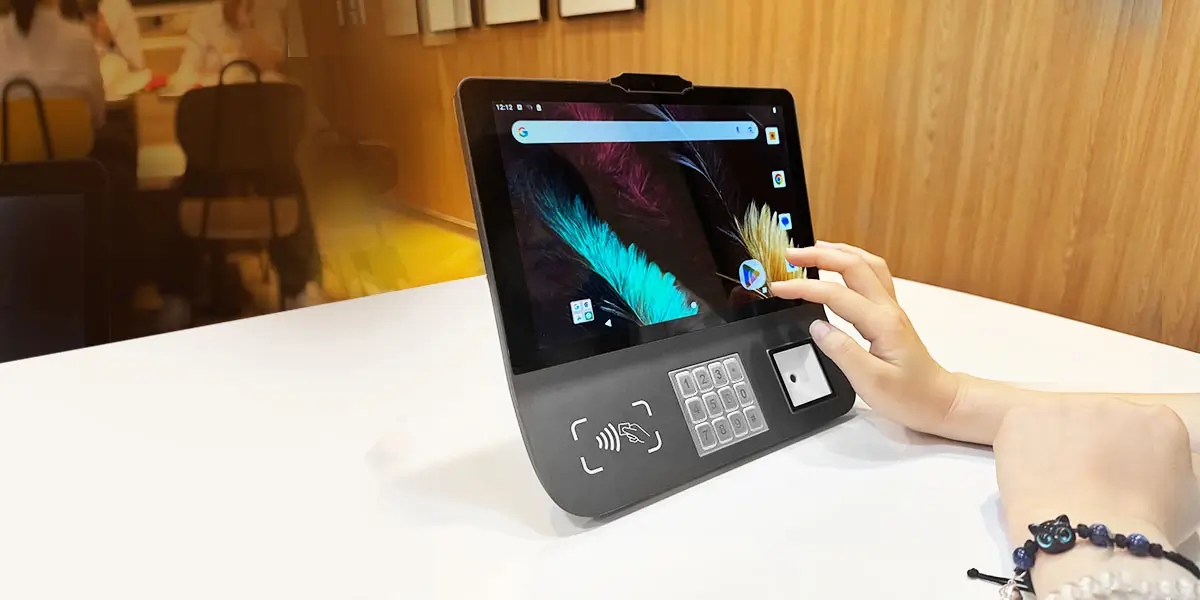
A cafe POS hardware stack in 2026 typically comprises a main touchscreen terminal, customer-facing display, thermal receipt printer, and payment reader. Compact Android all-in-one units — including the ZCS Z101 (Android 14, octa-core 2.2 GHz, 10.1-inch) — are leading choices for space-constrained espresso bar counter configurations where minimizing footprint is as important as processing performance.
The food service industry sells "restaurant POS" as a monolithic category, but the physical demands of a specialty coffee counter diverge meaningfully from a full-service dining room. Understanding that divergence is the prerequisite for making a sound hardware decision.
A standard restaurant host stand or cashier counter offers 90–120 cm of usable width. A typical espresso bar working surface — the strip between the grinders, tamping mat, and steam wand — narrows to 60–75 cm, and much of that is already claimed by equipment. Every centimeter of terminal footprint matters.
A conventional all-in-one PC POS unit (the kind with a tower base, separate rear customer display pole, and external printer) can easily consume 45–55 cm of counter depth. A compact Android all-in-one with an integrated rear display and a detached 80mm printer can be configured in under 30 cm of depth, with the printer mounted to a wall bracket or positioned flush against the backsplash. For many single-espresso-bar setups, this is the difference between fitting comfortably and creating a workflow obstruction.
Counter footprint: Cafe POS terminals typically occupy 25–55 cm of counter depth depending on form factor. Confirm the device supports VESA wall-mount or adjustable arm brackets to prevent counter congestion, particularly in espresso bar configurations with under 75 cm of usable working surface.
Between 7:30 and 9:00 AM on a weekday, a busy urban cafe might process 3–5 transactions per minute. At that cadence, a 400ms UI lag on each menu tap compounds into a meaningful queue extension by the end of the rush. If you notice your lines creeping out the door, it’s often because subtle hardware lags are quietly bottlenecking your checkout flow. Hardware processing power directly determines how quickly the POS application renders menus, confirms payments, and triggers print jobs.
Android POS terminals running on quad-core processors at 1.3–1.6 GHz exhibit measurable latency under concurrent load — running the POS application, Bluetooth printer communication, and a customer display feed simultaneously. Octa-core processors at 2.0 GHz and above eliminate this bottleneck for typical cafe workloads. RAM matters equally: 3 GB is the practical minimum for a stable Android 13/14 POS environment; 4 GB provides headroom for background processes such as loyalty sync or cloud reporting.
Thermal printer speed is the other variable most buyers underweight. The commercial range for POS receipt printers — as documented by Seiko Instruments thermal printing specifications and Epson's TM series — spans from around 80 mm/s on compact integrated units up to 350 mm/s on high-throughput standalone models. The right spec depends on actual peak transaction volume: a high-footfall urban espresso bar processing 4–5 orders per minute has meaningfully different throughput requirements than a neighbourhood cafe with a steady but lower cadence. Match the printer speed to the operation, not to a generic benchmark.
Steam, milk overspills, syrup drips, and daily cleaning with liquid sanitisers make the cafe counter one of the more hostile environments for unprotected electronics. Confirm any terminal carries at least an IP54 rating under the IEC ingress protection standard— the minimum certifying resistance to water splashing from any direction — and that the touchscreen uses tempered glass rather than an uncoated plastic overlay.
Three terminal architectures dominate the 2026 cafe market. Each carries distinct hardware trade-offs:
| Spec | Android All-in-One | iPad (with enclosure) | Dedicated POS Unit |
|---|---|---|---|
| Screen size | 8–15.6 inch | 9.7–12.9 inch | 10–15 inch |
| Processor | Octa-core, 2.0–2.4 GHz | Apple A-series | Intel Celeron / ARM |
| RAM | 3–6 GB | 4–8 GB | 4–8 GB |
| I/O ports | USB-A, USB-C, RJ11, RJ45 | Lightning/USB-C only | Full peripheral suite |
| OEM/ODM | Full support | Not available | Limited |
| Durability rating | Varies by model (some IP-rated) | No IP rating | Varies |
| Replacement cost | $145–$350 | $329–$799 | $400–$900 |
Android all-in-ones running Android 11–14 accept open SDK integration, allowing cafes — or their ISV partners — to embed custom loyalty systems, kitchen display triggers, or cloud inventory modules directly into the device firmware. The ZCS Z101, for instance, runs Android 14 on an octa-core 2.2 GHz processor with 3 GB or 4 GB RAM, supports USB-A, USB-C, RJ11, and RJ45 ports, and carries full OEM/ODM customization support — making it representative of the open-platform Android all-in-one category.
iPad-based setups are popular for their consumer-grade UX, but the hardware limitations are real: there are no native RJ11 ports for cash drawer triggers, no IP-rated enclosures, and replacement costs in the event of counter damage are substantially higher than comparable Android units.
Android all-in-one POS terminal (cafe-grade, 2026): integrates a 10–15.6-inch capacitive touchscreen, octa-core processor (2.0–2.4 GHz), 3–4 GB RAM, and multi-port I/O into a single counter unit. The ZCS Z101 (Android 14, 10.1-inch, $145–$180) and comparable units are selected for open SDK customization, broad peripheral compatibility, and low total replacement cost.
Customer-facing displays are often the first line item cut from a cafe POS budget. This is usually a mistake. Beyond order confirmation transparency — which directly reduces "wrong order" disputes — a CFD running dynamic promotional content can drive upsell attachment rates measurably. One operational study cited by the National Retail Federation found that digital customer-facing displays increase average transaction value by 3–8% in quick-service environments when configured with contextual upsell prompts.
For counter installations, three form factors are viable: the integrated dual-screen all-in-one (main screen flips 180° or has a built-in rear panel), the independent secondary display connected via USB or HDMI, and the rotating single-screen unit that swings toward the customer at checkout. In 2026, the standard CFD size range is 8–15 inches at 1280×800 or 1920×1080 resolution; anything below 800p renders promotional graphics poorly.
Customer-facing display for cafe POS (CFD, 2026 standard): a secondary screen (8–15 inches, 1280×800 minimum resolution) mounted facing customers to confirm order items and display promotions. Dual-screen all-in-one units and independently mounted rear displays are the two primary deployment configurations for espresso bar counter setups.
The 80mm paper width has become the de facto standard for cafe receipt printing. At typical transaction item counts (2–4 items), 80mm paper produces a clean receipt in a single pass; 58mm paper requires smaller font sizes that create readability complaints in older customer demographics.
Print speed selection should be driven by actual peak transaction volume rather than a single universal benchmark. Compact integrated printers — including the optional built-in module on all-in-one terminals like the Z101 — run at around 80 mm/s and suit moderate-traffic locations well. Standalone thermal printers for high-footfall urban cafes processing 4–5 transactions per minute may warrant faster units in the 200–300 mm/s range to prevent receipt output becoming the checkout bottleneck.
Cloud-connected printers add a meaningful resilience dimension: when the main terminal loses network connectivity, locally buffered print jobs can queue and release when the connection restores. For independent cafes without an on-site IT presence, this offline-tolerant architecture prevents receipt gaps during internet outages.
One specification point that rarely appears in vendor literature but matters in ambient cafe environments: acoustic output. High-speed thermal printers rated above 300 mm/s can emit 55–65 dB of operational noise. In a quiet third-wave specialty cafe, that level of mechanical noise during the customer's handoff moment is a brand experience consideration, not merely a technical footnote.
Per data from the Nilson Report's 2024 global payment trends analysis, contactless payment (NFC tap-to-pay) now represents over 60% of in-store card transactions in Western Europe, Australia, and parts of North America — with QR-based payment dominant in Southeast Asia and China. A cafe POS hardware configuration that does not natively support NFC in 2026 is behind the curve.
The hardware compliance point requires direct acknowledgment: **PCI-PTS and EMV Level 1/2 certifications are held by the payment service provider (PSP) or independent software vendor (ISV), not the terminal hardware manufacturer.** A hardware vendor can produce a device with the physical architecture to support certified payment flows, but the compliance certificate attaches to the PSP integration layer. When evaluating any POS terminal for payment processing, confirm certification ownership with the PSP, not the hardware supplier.
Among ZCS terminals, the Z90 holds direct payment certifications; other ZCS hardware models — including the Z101 — are designed for payment compatibility through certified PSP/ISV partners.
Payment certification: EMV and PCI-PTS compliance involves certifications held by the payment service provider (PSP) or ISV, not the hardware manufacturer. Be mindful of confirming PSP certification ownership if you plan to deploy payment-enabled terminals in regulated retail environments or markets requiring local scheme compliance.
Cash drawer connectivity on modern Android POS terminals is handled via RJ11 (the standard for most drawer models) or USB. Confirm that the terminal's RJ11 port is driver-compatible with the target drawer model before procurement — this is a common compatibility oversight in multi-vendor configurations.
The cashless trend is real but incomplete. As of 2026, cash remains a non-trivial payment method in many markets, particularly among older demographics and in regions with lower card penetration. A cafe that eliminates cash handling prematurely risks alienating a measurable customer segment. The practical approach is retaining cash capability with a low-profile drawer while ensuring the hardware configuration is optimized for the dominant contactless flow.
Fixed terminal capacity becomes the rate-limiting constraint when queue depth exceeds the counter's throughput ceiling. A useful heuristic: when the visible queue exceeds six customers and average service time per transaction is above 90 seconds, deploying a second operator with a mobile terminal reduces average wait time by 30–45%. Below that queue threshold, the ROI calculation for a second handheld unit typically does not clear the hardware cost within a single quarter.
For independent cafes (1–3 locations), a single mobile unit as a seasonal or event supplement is often sufficient. For chain brands managing high-footfall urban locations, permanent two-terminal configurations — one fixed, one roaming — are increasingly standard.
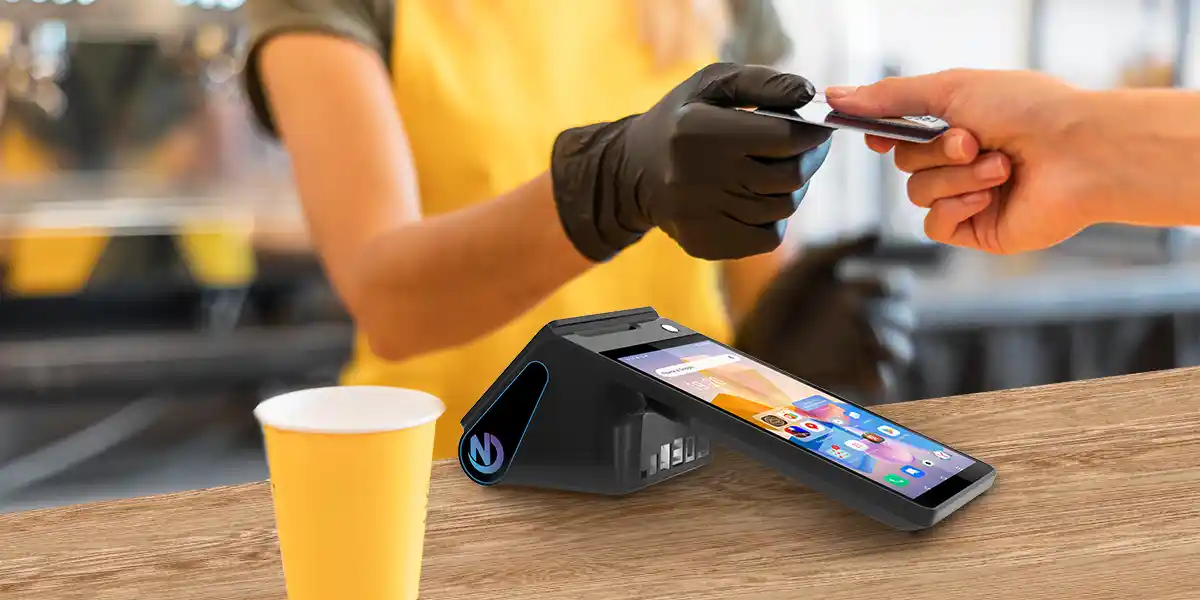
A mobile terminal used during a 90-minute morning rush without interruption requires a minimum 3,600 mAh battery under continuous POS application load; 4,000 mAh or above provides a safety margin that covers the full shift without a mid-service charge interruption. The ZCS Z108 in handheld configuration ships with a 3,600 mAh battery, adequate for a focused rush period; operators running full-day mobile deployments should confirm battery swap or fast-charge options are available.
Built-in barcode/QR scan modules outperform Bluetooth-attached scanners for speed and reliability in mobile workflows: there is no pairing lag, no battery dependency on a second device, and no Bluetooth interference risk in crowded RF environments.
Mobile POS battery: handheld cafe terminals typically require 3,600–5,000 mAh battery capacity for uninterrupted peak-hour use. Confirm the device supports hot-swappable battery modules or USB-C fast charging (18W minimum) to prevent transaction interruption during 2–3 hour continuous deployment windows.
Cafe Wi-Fi environments are among the most RF-congested in commercial retail. Customer guest networks operating on 2.4 GHz channels 1, 6, and 11 create significant interference for POS devices sharing the same spectrum. A terminal with dual-band 2.4 GHz + 5 GHz Wi-Fi (as found on the Z108) can be assigned to the less congested 5 GHz band, materially improving connection stability.
For roaming handheld deployments — outdoor terrace service, market stalls, pop-up activations — cellular failover via 4G LTE or 5G is the more reliable primary connection. 5G module integration in commercial Android POS hardware is available in 2026, though the cost premium remains significant for independent operators. The more common and cost-effective architecture remains 4G LTE with Wi-Fi as secondary.
When compiling a Coffee Shop POS Terminal Spec Checklist for an independent operator, total cost of ownership (TCO) over a 3–5 year hardware lifecycle should anchor the evaluation — not the initial sticker price. A $150 terminal that requires replacement at month 18 due to inadequate durability ultimately costs more than a $280 unit that runs reliably for 48 months.
At four or more locations, the hardware conversation shifts from unit-level evaluation to fleet management. Three criteria become non-negotiable: hardware standardization across all sites, centralized firmware management, and customization capability.
Terminal Management System (TMS) functionality — the ability to push firmware updates, configure application parameters, and monitor device health across all terminals from a single dashboard — is not a software feature; it depends on the hardware being TMS-compatible. ODM customization (custom chassis color, branded boot screen, logo-printed housing) transforms commodity hardware into a brand asset at scale.
ZCS supports both TMS integration and full ODM customization (minimum order quantity of 1,000 units) on the Z101 and other models, positioning the platform as a viable candidate for chain procurement exercises. Buyers at this scale should request hardware standardization agreements that specify firmware version lock, replacement unit equivalency, and spare parts availability over the contract term.
Multi-location cafe POS hardware management (TMS-enabled, 2026): involves centralized remote firmware updates, device health monitoring, and configuration synchronization across 4–500+ terminal units from a single dashboard. ODM-customized Android terminals with TMS compatibility are the standard specification for chain cafe procurement at 50+ locations.
Industrial-grade Android POS hardware carries a typical rated service life of 3–5 years under commercial use conditions. iPad-based POS setups, by contrast, face an effective replacement cycle of 2–3 years — driven by Apple's iOS compatibility windows and the absence of ruggedized repair options outside of AppleCare. Over a five-year cafe operation, the TCO differential between an industrial Android fleet and an iPad fleet is material at any scale above five units.
Hardware-as-a-Service (HaaS) models — where the terminal is leased with maintenance included — are available from several vendors in 2026. For independent operators with limited capital expenditure appetite, HaaS converts hardware cost to an operating expense and transfers replacement risk to the vendor. The trade-off is reduced customization flexibility and long-term per-unit cost that typically exceeds outright purchase.
Biometric authentication is entering the cafe POS environment through two distinct use cases: staff login verification (eliminating shared PIN codes) and high-frequency loyalty customer identification (eliminating the need to open a mobile app at checkout).
Fingerprint sensors are the most common biometric module available, but they carry a hygiene limitation that is acute in food service: contact-based recognition requires the operator's fingertip to touch a shared sensor surface repeatedly across a service shift. In a post-pandemic hygiene-conscious environment, this is a genuine barrier to adoption.
Palm vein recognition — which uses near-infrared light to map the unique subcutaneous vein pattern in a user's palm — operates without contact. Recognition occurs at 2–8 cm from the sensor. Published false acceptance rates (FAR) for commercial palm vein systems are in the range of 0.0001% (versus 0.001–0.01% for fingerprint), and false rejection rates (FRR) are comparable. ZCS produces a dedicated palm vein terminal series designed for integration with POS and access control environments, representing one of the few hardware manufacturers offering this capability as a native POS peripheral rather than an aftermarket addition.
Palm vein POS terminal (biometric, 2026): uses near-infrared contactless scanning to authenticate users at 2–8 cm distance, with a false acceptance rate of approximately 0.0001%. ZCS palm vein terminals are deployed for staff authentication and loyalty identification in food service environments where contact-based fingerprint sensors raise hygiene concerns.
Self-order kiosks are penetrating the independent cafe segment more slowly than QSR chains, primarily due to capital cost and floor space constraints. The ROI threshold for a standalone kiosk in a cafe environment is roughly 150–200 daily transactions; below that volume, the reduction in counter staffing does not cover hardware amortization within two years.
Kiosk hardware for cafe environments requires a 15–21 inch vertical IPS touchscreen (to accommodate full menu display without scrolling), industrial-grade capacitive touch (operable with light touch, no stylus required), and a live inventory synchronization interface with the main POS terminal. Without real-time stock sync, sold-out items remain selectable on the kiosk, generating customer dissatisfaction.
Cloud-native POS platforms reduce the on-device processing burden — transaction logic runs server-side, and the terminal acts primarily as an input/output node. This means the minimum viable hardware specification for a cloud POS is lower than for a locally processed system. The practical implication is that a $150 Android terminal with 3 GB RAM can run a cloud POS competently if network connectivity is reliable.
However, that dependency is also the vulnerability. Cafes in areas with unreliable broadband — or any operation that cannot afford a transaction outage — need terminals with meaningful local cache capability: the ability to accept orders and process offline transactions during connectivity interruptions and sync when the connection restores.
Cloud POS data storage compliance: cloud-based point-of-sale systems involve customer transaction data transmitted to third-party servers. Be mindful of GDPR data residency requirements or local data sovereignty regulations if you plan to deploy cloud POS terminals in EU member states or markets with explicit data localization mandates.
No vendor spec sheet replicates real operating conditions. Before committing to a hardware configuration — particularly for a multi-unit chain deployment — run the following evaluation protocol:
The quality of a hardware purchase is often determined more by the vendor's post-sale commitments than the unit's specifications. Before signing:
For cafe and F&B buyers evaluating Android POS hardware across multiple vendors, the table below compares ZCS against four commonly shortlisted brands across the specifications most relevant to a coffee shop counter environment: GMS and SoftPOS support, printer width, biometric options, SDK access, and ODM flexibility. Data sourced from official vendor datasheets.
| Specification | ZCS | PAX | Newland | SUNMI |
|---|---|---|---|---|
| Android Version | Android 16 (Z92S) / Android 15 (Z108) | Android 14 (PayDroid — closed) | Android 14 | Android 11/12 (SUNMI OS) |
| GMS Certified | Yes | No GMS | Not confirmed | Selected models only |
| 80mm Printer Support | Z93 / Z108 / Z100 | 58mm only | 58mm only | 58mm only |
| Fingerprint | available | Not available | Not available | Not available |
| Free SDK for ISV | Free SDK + Testing App + support | Paid / restricted | Varies | SUNMI DMP fee-based |
| ODM / OEM Customization | Full: logo, OS, hardware config, color | Brand only, no ODM | Brand only | Brand only |
Several specifications in this table are directly relevant to coffee shop counter deployments. Integrated customer-facing displays affect counter footprint decisions discussed earlier in this guide. 80mm printer support determines whether modifier-heavy drink receipts print cleanly in a single pass. GMS certification and SoftPOS support determine which contactless payment flows the terminal can run natively. Full ODM flexibility matters for chain cafe brands building consistent, branded hardware across multiple locations.To see how ZCS Integration compares against the world's top restaurant POS brands on operational efficiency, see our full brand comparison guide.
Selecting POS hardware for a coffee shop comes down to three criteria that cannot be compromised: physical fit within a constrained counter environment, sufficient processing and print throughput to sustain peak-hour volume without degradation, and an IP-rated enclosure durable enough to survive the moisture and cleaning cycles of a live cafe operation.
Independent owners should anchor their evaluation on total cost of ownership over a 3–5 year lifecycle, prioritizing durable Android all-in-ones that offer universal peripheral compatibility and realistic repair SLAs. Chain and multi-location buyers face a structurally different problem — fleet standardization, TMS firmware management, and ODM customization capacity determine whether hardware becomes a scalable asset or a procurement liability.
For the broader food service hardware picture across full-service restaurants, fast casual, and bar environments, see our complete guide to best POS systems for restaurants in 2026. To evaluate whether ZCS Android hardware is appropriate for your cafe configuration — single-unit trial or multi-site deployment — hardware samples and ODM consultation are available on request.

Q1. What hardware do I need for a coffee shop POS system?
Coffee shop POS hardware (standard configuration, 2026): requires a main touchscreen terminal (10–15 inch, Android or dedicated POS unit), thermal receipt printer (paper width 80mm recommended; print speed matched to transaction volume), customer-facing display (8–15 inch), NFC-enabled payment reader, and RJ11 cash drawer. Optional additions include a handheld mobile terminal and barcode scanner.
Q2. What is the best POS hardware for a small independent cafe?
Independent cafe POS hardware (1–3 locations, 2026): prioritizes compact form factor (under 30 cm counter depth), IP54+ spill resistance, octa-core processor (2.0 GHz minimum), and universal I/O ports (USB-A, RJ11). Android all-in-one units in the $145–$280 range with 3–4 GB RAM represent the optimal durability-to-cost profile for single-location deployments.
Q3. Does a coffee shop POS need a customer-facing display?
Customer-facing display: cafe POS setups typically benefit from an 8–15 inch CFD running at 1280×800 minimum resolution. Confirm the display supports dynamic content updates (promotional media) and real-time order confirmation to prevent order disputes and capture upsell revenue at the point of transaction.
Q4. Can I use a tablet like an iPad as a cafe POS terminal?
iPad POS terminals: consumer tablets typically lack IP-rated enclosures, native RJ11 cash drawer ports, and OEM repair pathways. Confirm that any tablet-based setup includes a purpose-built enclosure (IP54 minimum), a certified cash drawer interface, and a vendor repair SLA before deployment in high-moisture or high-volume cafe environments.
Q5. What is the difference between a cafe POS terminal and a restaurant POS terminal?
Cafe POS terminal vs. restaurant POS terminal: cafe units prioritize compact footprint (under 30 cm depth), IP-rated spill resistance, and fast thermal print speeds (250+ mm/s) for high-cadence beverage transactions. Full-service restaurant terminals prioritize larger screen real estate (12–15 inch), table mapping integration, and kitchen display system (KDS) output — hardware requirements distinct from the linear counter workflow in coffee shop environments.






 Home
Home  Paying With Your Palm: How Amazon One Changed Biometric Payments (And What Comes Next)
