
2026-06-22 Author : ZCS
It's 8:15 AM. Six people are in line. Your barista taps the screen — nothing happens for two seconds. She taps again. The printer stutters. The customer behind the first one sighs audibly and checks their watch.
That two-second lag does not feel significant in isolation. Across 40 transactions in a 90-minute rush, it adds up to a meaningful chunk of lost throughput — and in some cases, lost customers who simply leave the queue.
The instinct is to blame the software. Nine times out of ten, the hardware is the actual bottleneck. But hardware is rarely the only culprit. A bloated menu architecture, an unindexed transaction database, and a contactless payment stack that hasn't been updated all contribute to the same symptom: a queue that moves slower than it should. Here's how to diagnose each one.
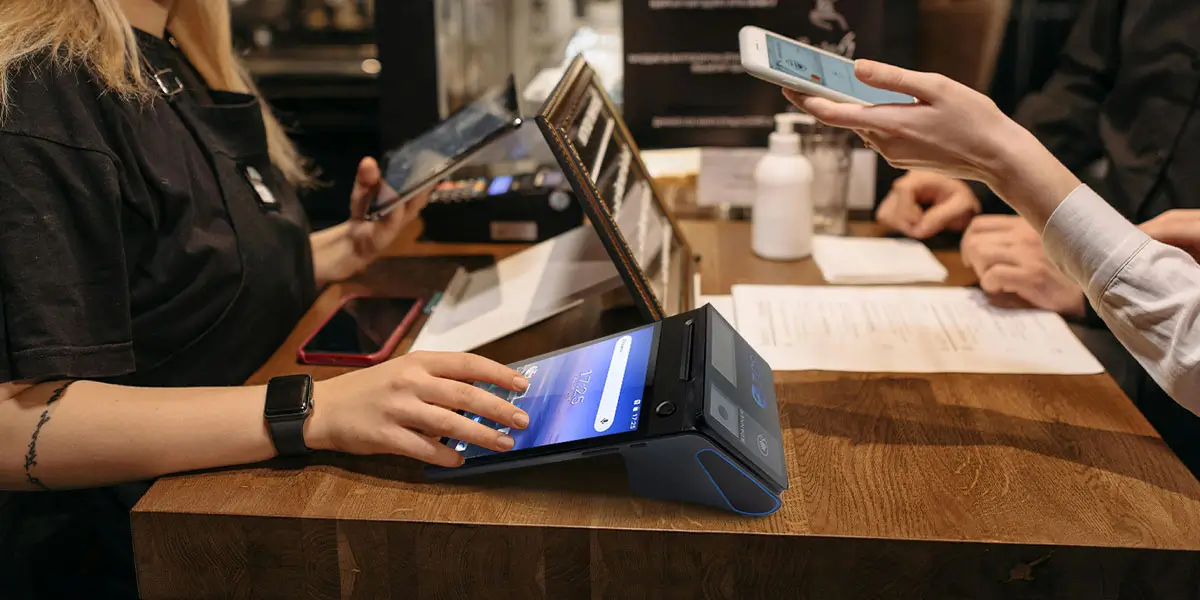
A coffee shop point of sale terminal is rarely doing just one thing. During a transaction, the device is simultaneously running the POS application, maintaining a Bluetooth connection to the printer, feeding the customer-facing display, and syncing sales data to the cloud. On a terminal with a quad-core processor running at 1.3–1.6 GHz — common in budget hardware — these overlapping processes compete for resources, and the UI becomes the first casualty.
The symptom: Taps register late, or require a second press. Menu screens redraw slowly after item selection. The fix is not a software update; it's a processor upgrade. Octa-core units running at 2.0 GHz and above handle these concurrent workloads without visible latency.
RAM follows the same logic. A POS application running on 2 GB of RAM will begin swapping memory during a sustained rush, causing the exact stuttering behavior that looks like a frozen screen. The minimum viable spec for a stable Android POS environment in 2026 is 3 GB RAM; 4 GB provides reliable headroom.
This bottleneck is invisible in hardware diagnostics — but it shows up in every transaction count. When high-frequency items are buried under two or three subcategory layers, or when each drink modifier requires a separate screen tap to confirm, the time cost accumulates across hundreds of orders per day. A barista who has to make four taps to ring up a standard flat white is slower than one who makes two, regardless of how fast the processor is.
The symptom: Staff navigation feels sluggish even when the terminal responds quickly to input. Order entry time is disproportionately long relative to payment time. The fix is architectural: move the top 10–15 items by order volume to the home screen, consolidate modifier lists, and reduce subcategory depth to a maximum of two levels. This is a configuration change that costs nothing and can recover 2–4 seconds per transaction — equivalent, at volume, to meaningful additional throughput during a morning rush. If you're asking why is my POS lagging, this is the first place to look before touching the hardware.
This one surprises most cafe owners. The terminal feels fast, but customers are standing at the counter waiting — for the receipt.
Print speed is measured in millimetres per second, and the commercial range for point-of-sale printers — as documented in Epson TM-series technical specifications and comparable references — spans from around 80 mm/s on compact integrated units up to 350 mm/s on high-throughput standalone printers. Where the printer sits in that range should reflect transaction volume: a high-footfall urban espresso bar processing 4–5 orders per minute has different requirements than a neighbourhood cafe averaging one order every two minutes. If customers are visibly waiting at the counter after the terminal has confirmed payment, the printer speed is worth auditing against actual peak transaction counts.
Paper width matters too. 58mm paper requires compressed font sizes and occasionally wraps items across two lines, adding print time. 80mm is the practical standard for coffee shop point of sale environments where receipts include customized drink modifiers.
This is less a technical problem and more a workflow one — but hardware choices drive it. When the POS terminal, the payment reader, the receipt printer, and a customer display pole are all competing for 60–70 cm of espresso bar counter space, staff movements become constrained. Reaching across equipment, rotating screens toward customers, fumbling for the card reader — each adds 3–5 seconds per transaction.
A compact Android all-in-one terminal with an integrated rear customer display and a wall-mounted or bracket-mounted printer reclaims meaningful counter space. The operational benefit is not cosmetic; it directly reduces the physical motion required per transaction. For cafe point of sale setups where the barista is also the cashier, this matters considerably.
Counter footprint: cafe POS terminals typically occupy 25–55 cm of counter depth depending on form factor. Confirm the device supports VESA wall-mount or adjustable arm brackets to consolidate the hardware footprint, particularly in espresso bar configurations with under 75 cm of usable working surface.
Not all payment slowdowns are caused by network issues. The payment terminal itself — if it's running an older EMV chip protocol without contactless support — may be the source. A traditional chip-and-PIN transaction requires the card to remain inserted while the terminal completes a handshake with the payment processor, a process that typically takes 4–6 seconds. A tap-to-pay transaction using NFC — covering Apple Pay, Google Pay, and contactless card schemes — completes in under 500 milliseconds under normal conditions.
The symptom: Payment feels slow even when the POS software confirms the order instantly. Customers insert cards and wait visibly. The fix involves two steps: confirm that the payment terminal supports NFC contactless, and actively prompt customers to tap rather than insert at the point of payment. For multi-location operators, this is also worth auditing in the context of what are the common issues with POS systems across sites — contactless adoption rates vary by location and can be a meaningful differentiator in queue speed. Additionally, check that the terminal's firmware is current; outdated payment firmware can introduce processing delays that do not appear in software logs.
A Wi-Fi outage at 8:30 AM in a busy urban cafe is not a hypothetical. Guest networks saturated by customers, interference from neighboring businesses, and router reboots all create real connectivity gaps. If the POS terminal has no offline transaction capability, the result is a hard stop: no payments accepted, queue backed up, staff improvising.
The solution is not better Wi-Fi — it's hardware with genuine offline mode. A terminal that caches transactions locally and syncs when connectivity restores keeps service running through a 5–10 minute outage without interruption. This is a firmware and hardware architecture decision, not a software toggle; confirm the spec explicitly before purchasing.
For mobile and handheld terminals used for queue-busting during rush periods, the additional layer is cellular failover. A terminal with 4G LTE as a secondary connection switches automatically when Wi-Fi degrades, with no action required from staff. The Wi-Fi Alliance's technical guidance on network congestion documents the spectrum crowding behaviour common in dense commercial environments — a real and persistent issue for cafe POS reliability.
Payment network fallback: Cafe POS terminals in high-density urban environments typically encounter Wi-Fi degradation during peak hours. Confirm the device supports local offline transaction caching or 4G LTE failover to prevent payment interruption during network drops at the espresso counter.
A terminal that has been in service for two or more years without database maintenance accumulates a significant overhead cost that is invisible during low-traffic periods and fully apparent during rush hours. Sales records, voided transactions, loyalty lookups, and unarchived historical data all increase the time it takes the POS software to execute search queries, load customer profiles, and complete end-of-day reconciliation tasks in the background while staff are still processing orders.
The symptom: The terminal performs acceptably at opening but degrades noticeably after an hour of continuous use. Reporting functions take longer to load over time. Screen transitions between order entry and payment are smooth in isolation but lag under load. The fix is routine database maintenance: archive historical transaction data on a monthly schedule, clear application cache during non-business hours, and confirm that background sync intervals are set to off-peak windows rather than continuous. If your POS provider offers a cloud-hosted database option, migrating local transaction storage off the terminal hardware removes the bottleneck entirely. This kind of back-end housekeeping is one of the most overlooked answers to what are the common issues with POS systems in established cafe operations.
If the terminal is more than four years old and running a version of Android below 11, the hardware may simply have reached end-of-life for the software stack it's running. Operating system fragmentation on aging Android devices is a documented issue in commercial POS deployments, and a software patch will not resolve a hardware architecture mismatch.
For independent cafe owners replacing a single terminal, the essential Coffee Shop POS Terminal Spec Checklist includes:
For operators running multiple locations, the additional requirement is centralized firmware management — the ability to push updates and monitor device health across all terminals without visiting each site. This is what separates a scalable hardware deployment from a collection of individually managed devices. Understanding how to get more customers in a coffee shop starts with ensuring the operational infrastructure can handle increased volume without degrading — a slow queue is a customer retention problem, not just a technology one.
Queue slowdown during peak hours is one of the most visible and operationally costly problems a cafe faces — and it is almost always fixable at the hardware or configuration level before it requires staffing changes or layout redesign. The investments required are incremental: a faster printer, a processor upgrade, a simplified menu tree, a bracket mount that clears the counter.
For a deeper breakdown of every hardware component in a cafe POS setup — terminal specs, customer displays, payment readers, and procurement criteria for both independent owners and chain buyers — see our complete guide to best POS hardware for coffee shops and cafes in 2026.
Technical references: Epson TM-series thermal printer specifications; Wi-Fi Alliance network congestion documentation; IEC IP54/IP65 ingress protection standards.

Q1. Why is my POS lagging specifically during the morning rush but not at other times?
Peak-hour lag is almost always a resource contention problem rather than a software fault. During rush periods, the terminal is handling simultaneous tasks — order entry, printer communication, cloud sync, and customer display output — that exceed what the processor and RAM can manage concurrently without visible latency. A terminal with a quad-core processor at 1.3–1.6 GHz and 2 GB of RAM will produce exactly this pattern: normal performance at low volume, degradation under load. The diagnostic step is to check whether the lag is in the UI (processor/RAM), at the printer (print speed ceiling), or at payment (network or NFC firmware). Each has a different fix. If the hardware spec is below octa-core and 3 GB RAM, a software patch will not resolve it.
Q2. What are the common issues with POS systems in busy coffee shops?
The most frequent issues in high-volume cafe environments cluster into four categories. First, hardware under-specification — processors and RAM that cannot handle concurrent tasks during rush hours. Second, menu architecture problems — too many subcategory layers that require excess taps per order. Third, connectivity failures — Wi-Fi degradation in dense commercial areas, with no offline fallback. Fourth, payment terminal lag — outdated chip-and-PIN workflows that have not been updated to NFC contactless processing. Database bloat from unarchived transaction histories is a fifth issue that typically develops after 12–18 months of operation and is frequently overlooked because it appears gradually rather than as a sudden change in performance.
Q3. How to get more customers in a coffee shop when queue length is already turning people away?
Queue abandonment — customers who join a line, assess the wait, and leave — is a direct revenue loss that hardware optimization directly addresses. The throughput ceiling in most cafe setups is not staff count; it's transaction processing time per order. Reducing that by 3–5 seconds through faster printers, simplified menu navigation, and contactless payment adoption meaningfully increases the number of customers served per hour without additional headcount. Mobile POS terminals used for queue-busting — taking orders and processing payments at the back of the line before customers reach the counter — are the most direct hardware intervention for high-demand periods. Operationally, the answer to getting more customers through the door is ensuring the existing customer experience is fast enough that word-of-mouth is positive rather than neutral.
Q4. How do I reboot a POS system without losing transaction data or disrupting service?
The procedure depends on the system architecture, but the general sequence for Android-based cafe POS terminals is: complete and close any open transactions before initiating a restart; confirm that the POS application has synced its local queue to the cloud or backend server (most applications display a sync status indicator); then use the terminal's standard restart function rather than a hard power cycle. A hard power cycle — holding the power button until the screen goes dark — risks interrupting an in-progress sync and can corrupt the local transaction log. If the terminal must be restarted mid-shift due to a freeze, document the last confirmed transaction before rebooting and reconcile manually if the log shows a gap. For terminals with offline caching, check the sync queue after restart to confirm all cached transactions have been uploaded before continuing service.
Q5. Is it worth repairing a slow POS terminal, or should I replace it?
The decision threshold is roughly this: if the terminal is under three years old and running Android 11 or above, configuration and maintenance changes — database cleanup, menu restructuring, a printer upgrade — are likely to restore acceptable performance without hardware replacement. If the terminal is four or more years old and running Android 10 or below, the underlying hardware architecture is likely incompatible with the current demands of the POS software stack, and the software cannot be updated to compensate for the hardware ceiling. At that point, the ongoing cost of lost throughput during rush hours — in both revenue and customer experience — typically exceeds the cost of a commercial-grade replacement terminal. For multi-location operators, a terminal reaching end-of-life is also a security risk, as aging Android versions no longer receive security patches that payment compliance standards require.






 Home
Home  Hospitality POS Systems: What Hotels, Resorts and F&B Chains Need From POS Hardware
