
2026-11-26 Author : ZCS
VietQR payments are a central part of the Southeast Asia payment landscape, where national QR systems often matter as much as card acceptance. In Vietnam, the customer's familiar action is simple: open a banking or payment app, scan the merchant's code, review the details and authorize the transaction.
Behind that scan are several different services. VietQR standardizes the QR information. A bank or payment app reads it. NAPAS and participating institutions support the payment infrastructure. The merchant's bank, payment provider or sales system reports the result. Understanding those roles answers the practical question: after a customer scans a VietQR code, how does the shop know the money actually arrived?
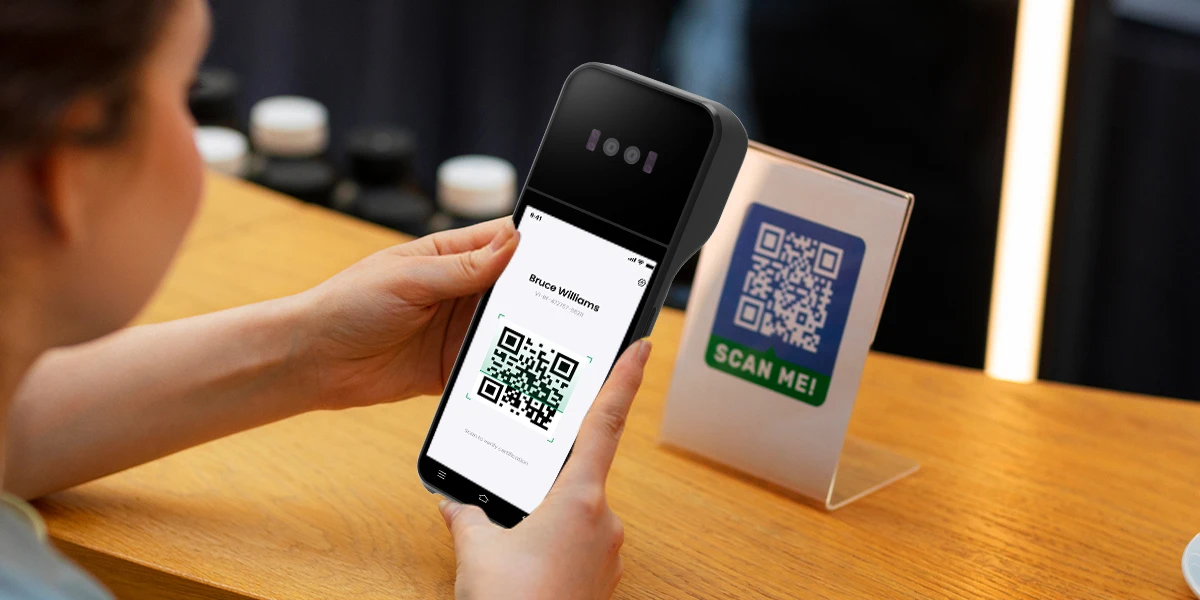
VietQR is the common brand and QR standard used for QR-based transfers and payments processed through NAPAS, participating banks, payment intermediaries and connected partners. NAPAS and 14 banks launched the brand with the NAPAS 247 fast-transfer service in 2021. The official launch announcement describes VietQR as a shared identity for interoperable QR transfers and payments.
The QR code is a structured container for payment information. Depending on the implementation, it can include or help retrieve:
The QR code is not money and does not approve the payment. The customer scans it with a supported app, checks the information shown by that app and confirms the transaction using the app's required authentication method.
Vietnam's central bank has issued common technical specifications for QR payments. The State Bank of Vietnam's merchant-presented standard supports codes displayed by acceptance points, while its 2024 customer-presented QR specification supports the opposite model. For ordinary shop checkout, the merchant-presented flow is the most familiar: the shop displays the QR and the customer scans it.
The name VietQR is used around related but distinct payment experiences. Merchants should separate a bank-account transfer QR from the newer order-linked VietQRPay service.
| Feature | Basic VietQR transfer | VietQRPay merchant payment |
|---|---|---|
| Main purpose | Send money to a person or business bank account | Pay for a specific merchant order |
| Typical data | Receiving bank and account; amount or message may be entered by the customer | Merchant, amount, order information and a unique transaction reference |
| POS connection | Often separate from the sale record | Designed for integration with merchant and sales-management systems |
| Confirmation | Merchant checks the bank or transfer notification | Integrated status can update the checkout or merchant system |
| Reconciliation | Often depends on amount, time and transfer message | Uses order and transaction references for matching |
| Refund handling | Merchant makes a separate return transfer | Provider workflow can support inquiry, cancellation, refund or dispute handling |
The basic transfer model is accessible to small sellers because they can print a receiving QR code at the counter. It removes the need for customers to type a long account number. It does not automatically tell the POS which order was paid.
VietQRPay is the merchant-payment layer. The official VietQRPay service description covers real-time merchant payments, standardized transaction reference IDs, API integration and automated reconciliation. A 2026 NAPAS and KiotViet integration announcement explains that a VietQRPay transaction can be linked to the order and payment amount, allowing merchants to reconcile sales and handle inquiries, refunds, cancellations or disputes.
That distinction matters at a busy counter. Receiving money is only one requirement. The merchant must also know which order the money belongs to, whether the amount is correct and whether the checkout can be closed.
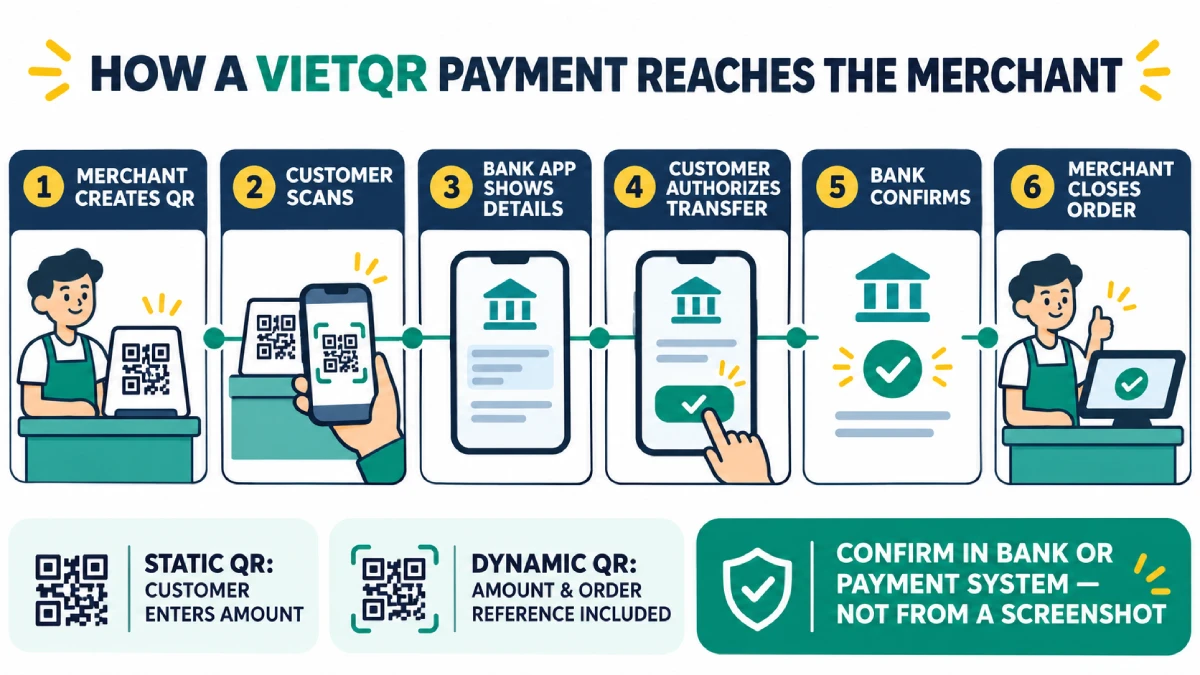
A small seller may display a fixed QR that identifies its bank account. An integrated checkout can generate a QR for one order, including the amount and a reference that connects the payment to the sale.
The code can appear on a printed counter sign, a POS screen, a customer-facing display, a receipt or an online checkout page. The display method does not decide how the transaction is processed. The data behind the QR and the connected service do.
The customer opens a supported banking or payment app and scans the merchant-presented code. The app reads the encoded information and shows the payment screen.
For a fixed receiving code, the customer may need to enter the amount and transfer message. For an order-specific code, the app can receive the amount and reference directly, reducing typing and wrong-amount errors.
The app should show the recipient or merchant information and the amount before authorization. The customer checks these details because scanning a genuine-looking sign is not enough. A replaced or altered QR can direct a transfer to the wrong account.
The customer should stop if the displayed recipient or amount does not match the purchase. The bank or payment app is the trusted place to review what will actually be authorized.
The customer confirms the transaction using the bank or payment app's required method. This can include a PIN, password, OTP or local biometric authentication, depending on the app, device and transaction controls.
The authorization happens inside the customer's financial app. The merchant's printed QR does not capture the customer's banking password or approve the transfer.
The participating banks, payment providers and NAPAS infrastructure carry the transaction and return its status. NAPAS describes VietQRPay as a real-time payment service with immediate merchant crediting within the supported service flow.
The shop still needs a reliable success message. The cashier should not release goods simply because the customer reached a completion screen.
An integrated merchant system receives or retrieves the payment result and matches the reference to the open sale. It marks the order paid once, prints or sends the receipt, and records the transaction for later reconciliation.
If the status remains pending or unknown, the order should stay open until the merchant checks the bank or provider record. Repeatedly generating new payments can create duplicates.
A static QR code normally keeps the same receiving details for many transactions. It is inexpensive to deploy because a shop can print it once and place it at the counter. The customer may need to type the amount or transfer description.
Static codes work best where transaction volume is low and staff can monitor incoming payments. Their main weakness is matching. If three customers send the same amount within a few minutes, a cashier may struggle to identify which transfer belongs to which order.
A dynamic QR code is created for a particular checkout or order. It can include the amount and an order or transaction reference. The customer scans a new code for each purchase, while the merchant's software waits for the matching status.
Dynamic QR is better for supermarkets, restaurants, pharmacies, ticket counters, online orders and other environments where the system must connect payment to a sale automatically. It also reduces disputes caused by mistyped amounts and vague transfer messages.
The safest confirmation comes from the merchant's own bank, payment provider or connected POS service. It should contain enough information to match the transaction to the order.
Reliable confirmation channels include:
A customer screenshot is not a settlement record. Images can be old, edited or taken before a transaction fails. A sound checkout process trains staff to look at the merchant-controlled confirmation, not the customer's screen.
The merchant system should also protect against duplicate updates. If the same success message is received twice, the POS must close the order only once. Each order, QR and payment reference should have a clear status such as created, pending, paid, expired, cancelled or refunded.
A useful VietQR integration connects four records: the order, the QR, the payment result and the accounting entry.
The workflow is:
This is more dependable than asking the cashier to compare only the amount. It also makes POS reconciliation easier because the sales report and payment report share identifiers.
For software providers, the important integration functions are QR creation, payment-status handling, transaction inquiry, cancellation or refund support, timeout handling and reconciliation export. The screen that displays the code is only the visible front end.
VietQR and card payments can both complete a retail sale, but their routes are different.
In a typical card payment, a merchant terminal sends an authorization request through an acquirer and card network to the card issuer. Clearing and merchant settlement follow. In a VietQR bank-transfer flow, the customer initiates an account-based transfer from a banking or payment app after scanning the merchant's code.
For another market’s approach to account-based payments, see NIBSS Instant Payments in Nigeria. The useful comparison is how each service connects a customer’s transfer to merchant confirmation and order reconciliation.
This difference affects operations:
A wallet QR can be limited to one wallet's users and merchant network. VietQR is designed around a common format and interoperability among participating institutions. The customer's supported app and the merchant's configured service determine which funding sources and flows are available.
Merchants do not need to choose only one method. A POS can offer VietQR beside cash, cards and other local payment options, then record each method separately in the sale and settlement reports. The wider payment-processing workflow should keep authorization or transfer status, refunds and payouts traceable by channel.
VietQR does not create one universal commercial agreement for every merchant and customer. Fees, transaction limits, cutoff rules, supported apps and refund procedures depend on the participating bank, payment provider and merchant service.
Merchants should confirm:
A refund is a new money movement or a provider-managed return process. Removing the order from the POS does not automatically send funds back to the customer. Staff need a controlled refund workflow that records the original payment reference, refund amount, reason, approver and final status.
VietQRGlobal extends the QR ecosystem to connected international payment networks. It is separate from the ordinary domestic transfer that a Vietnamese shopper makes to a Vietnamese merchant.
The same operational rule appears in neighboring QR markets: the code starts the payment, while the merchant-controlled status closes the sale. The guide to MMQR payments in Myanmar shows how another national QR system handles static and dynamic codes, merchant confirmation and POS reconciliation.
Cross-border availability depends on the direction of the connection, participating institutions and enabled acceptance points. A service that lets Vietnamese users scan abroad does not automatically mean every foreign app can scan every VietQR code in Vietnam.
NAPAS has launched and expanded bilateral QR connections with regional partners. Merchants serving tourists should confirm which inbound wallets or banking apps are supported, how currency conversion is shown, what fees apply and how the cross-border transaction appears in their settlement report.
Before placing a VietQR code at checkout, define the operating process as carefully as the payment method.
VietQR payments let customers use familiar banking and payment apps to scan standardized payment information and authorize a transfer. For a small seller, a fixed VietQR code can provide a simple way to receive money. For a busy merchant, VietQRPay adds the order references, status messages and reconciliation functions needed to operate checkout at scale.
The decisive step is not the scan. It is the merchant's confirmation that the correct transaction reached the correct account and matched the correct order. A reliable deployment connects the QR, the bank or payment service, the POS sale and the reconciliation report in one traceable workflow.

VietQR is a common QR format and brand used for interoperable bank transfers and payments across NAPAS, participating banks, payment intermediaries and connected partners in Vietnam.
No. Scanning loads payment information into a supported app. The customer reviews the details and authorizes the transaction before money moves.
The payment goes to the bank account or merchant destination identified by the QR and displayed in the customer's app. The merchant should verify the recipient configuration before using the code.
A basic VietQR code can support an account transfer. VietQRPay is designed for merchant checkout and can connect the amount, order information, transaction reference, confirmation and reconciliation workflow.
Yes. A static code can be reused, but the customer may need to enter the amount or message and staff must match each bank transfer to the correct sale. Dynamic codes are better for automated order matching.
No. The merchant should confirm the transaction in its own bank app, provider portal or integrated POS system before closing the order.
Yes. An integrated service can generate an order-specific QR, receive the transaction result, update the order and export records for reconciliation.
The merchant follows the refund or return-transfer process provided by its bank, VietQRPay service or merchant platform. Cancelling the POS order alone does not return the money.






 Home
 What Is Merchant Acquiring and How Do Acquirers Move Card Payments to Merchants?

