
2026-08-31 Author : ZCS
Key Takeaways
Utility collection is a field transaction problem before it is a POS specification problem. A collector or authorized payment agent may need to identify an electricity or water account, retrieve the amount due, accept cash or electronic payment, print proof of payment and synchronize the transaction with a central billing platform. The hardware therefore sits between customer account -> payment -> receipt -> reconciliation, rather than replacing the utility billing system itself.
Bill payments also remain a major recurring payment category. A 2026 World Bank report describes bill payments as one of the large-volume recurrent flows suited to fast-payment infrastructure, alongside government and public-transport payments.World Bank fast-payment analysis.That scale makes reliable collection, transaction status and reconciliation more important than headline CPU specifications.
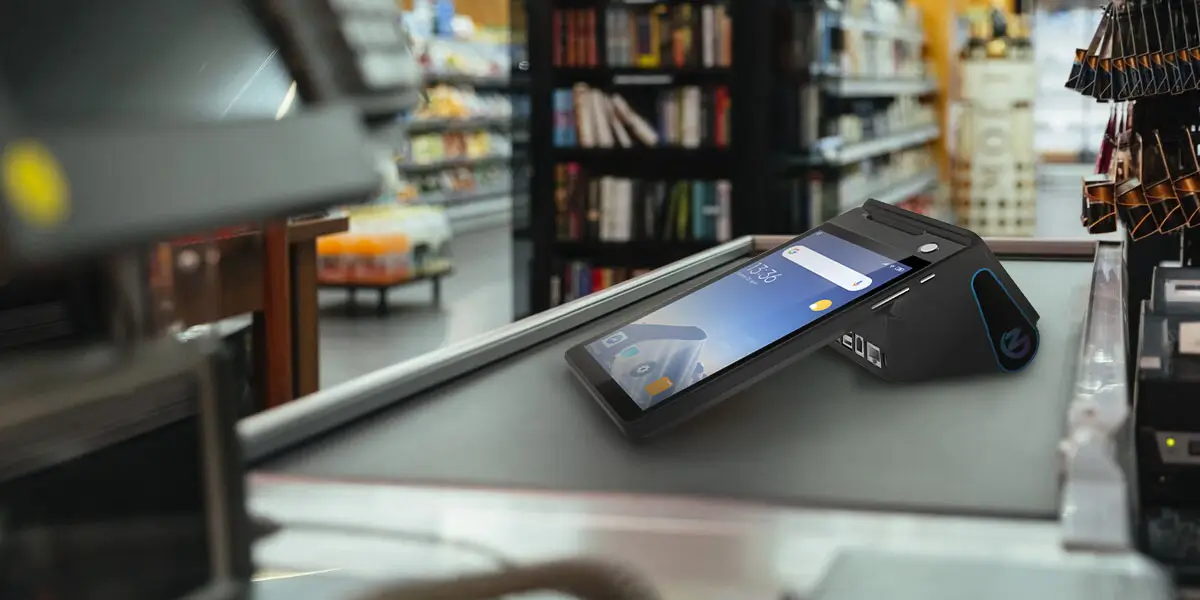
A utility bill collection POS terminal is a handheld or counter payment device used by utility staff or authorized agents to retrieve customer bills, accept payment, issue receipts and synchronize transaction records with a central utility system. The device may serve electricity, water, gas or multi-biller collection, but account balances, tariffs and ledger updates normally come from the billing application and backend.

The distinction prevents a common procurement error. A spot billing machine may be optimized for meter reading and bill generation, while a utility payment POS terminal is optimized for collecting money against an existing account. Some projects combine the workflows, but buyers should not assume one function automatically includes the other.
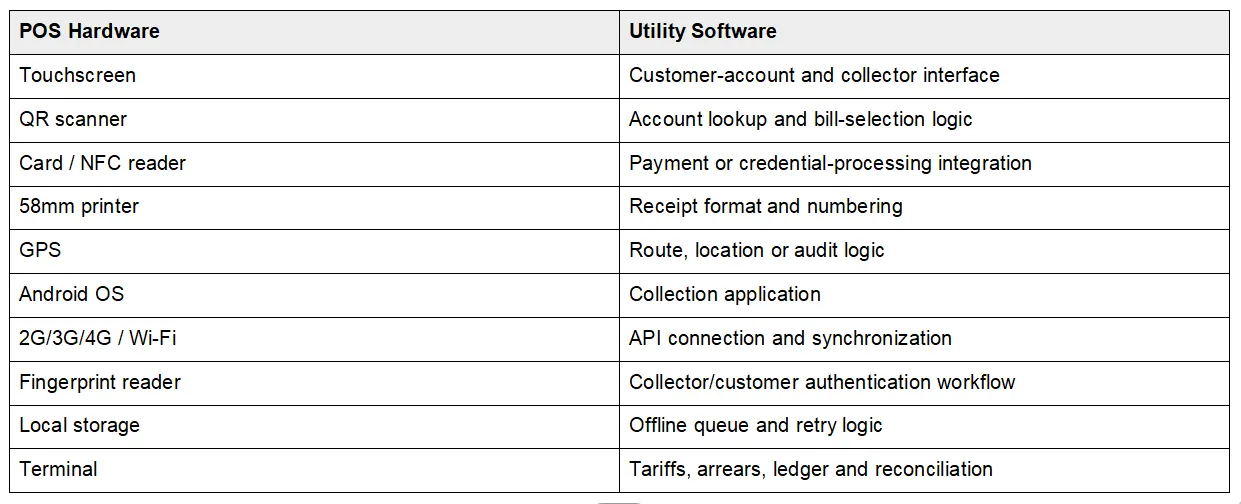
The POS should not silently recalculate utility tariffs unless the deployed application is explicitly designed to do so. Tariff tables, arrears, penalties and account balances are business rules. The terminal provides the screen, scanner, payment interfaces, printer and connectivity used by that software.
Field collection places the greatest pressure on portability and connectivity. A collector may work away from fixed power, move between neighborhoods and lose cellular signal during a transaction. A handheld terminal therefore benefits from 2G/3G/4G fallback, integrated printing, GPS, a hand strap or protective case, and a software workflow that can recover from interrupted synchronization.
Agent collection usually prioritizes multi-biller software and fast account lookup. A single agent may accept electricity, water, telecom or municipal payments from one Android POS. The hardware requirements remain similar, but the application must separate billers, route transactions to the correct backend and reconcile each settlement independently.
A fixed utility office does not always need a handheld design. Stable power, larger screens and high queue volume can justify a desktop POS or PC-based counter. A Z90-style handheld terminal makes more sense when mobility, integrated card acceptance or temporary collection points matter.
The first network question is not whether the terminal supports 4G; it is what happens when 4G disappears after the customer has paid. The application should expose pending status, transaction-status queries, controlled retry and duplicate prevention. A field collection POS should never create uncertainty over whether a payment succeeded simply because the mobile network dropped.
Continuous internet access should not be treated as a guaranteed field condition. A utility collection design needs explicit rules for local transaction storage, reconnect, retry and reconciliation; cellular hardware provides the transport, while software determines how an interrupted payment is recovered.
Android matters because utilities and integrators usually need a customized collection application. An Android POS for utility bill collection can connect to billing APIs, payment SDKs, receipt templates and device-management services. ZCS also publishes an Android POS SDK and ODM guide for projects that need firmware, application or peripheral integration.
A built-in printer is particularly valuable where customers expect immediate physical proof of payment. The World Bank's Global Findex 2021 analysis found that about 620 million account owners still paid utility bills in cash, with lack of proof of payment cited among the reasons some users avoided digital utility payments. Global Findex utility-payment analysis Printer failure can therefore become a trust and service problem, not merely a paper-handling inconvenience.
Card acceptance and account identification should be specified separately. Magnetic stripe, contact IC, NFC and QR can support different payment or identification flows. EMVCo defines EMV Contactless for chip cards and NFC-enabled mobile devices and maintains testing and approval processes for payment acceptance devices. EMVCo contactless guidance An NFC reader alone does not establish that a complete local card-acquiring solution is ready.
Scanning reduces manual entry of long utility account numbers. A collector can scan a previous bill, account barcode or QR code, then verify the customer before taking payment. The scanner hardware reads the code; the utility application still determines which account, invoice or payment request that code represents.
GPS can support transaction-location records and collector-route auditing, but only when the application uses the location data. Built-in GPS does not automatically create workforce tracking. A deployment should define whether location is stored per transaction, how long it is retained and which administrators can access it.
Battery testing should combine the screen, cellular modem, GPS, scanning and repeated printing. Standby claims are a poor proxy for a collector shift. Procurement teams should run the intended utility application for a full workday and record remaining capacity under representative network conditions.
Distributed utility fleets need remote control once deployment reaches hundreds of terminals. Application updates, configuration, inventory, logs and terminal status should not require collectors to return every device to headquarters. ZCS's Cloud TMS Managed POS guide describes centralized update and monitoring capabilities for distributed POS networks.
A POS does not electronically process cash; it records a cash transaction and creates an audit trail. A $50 cash payment should be linked to the customer account, collector, terminal ID, receipt number and timestamp, then included in the collector's end-of-day settlement. The operational controls are transaction recording and reconciliation rather than card authorization.
Cash utility collection therefore depends on the same data discipline as digital payment. The POS records who collected the amount, the billing account, the payment method and the receipt identifier; the backend uses those records to reconcile expected physical cash against posted customer payments.
ZCS Z90 is best evaluated as a handheld Android payment hardware platform for mobile collection, not as a complete utility billing system. The current Z90 page lists ZOS based on Android 7.1/12.0, a 5.0-inch 720 x 1280 touchscreen, 2G/3G/4G, Wi-Fi, GPS, Bluetooth, a 58mm thermal printer, card interfaces, 1D/2D scanning and optional fingerprint collection. ZCS Z90 product specification
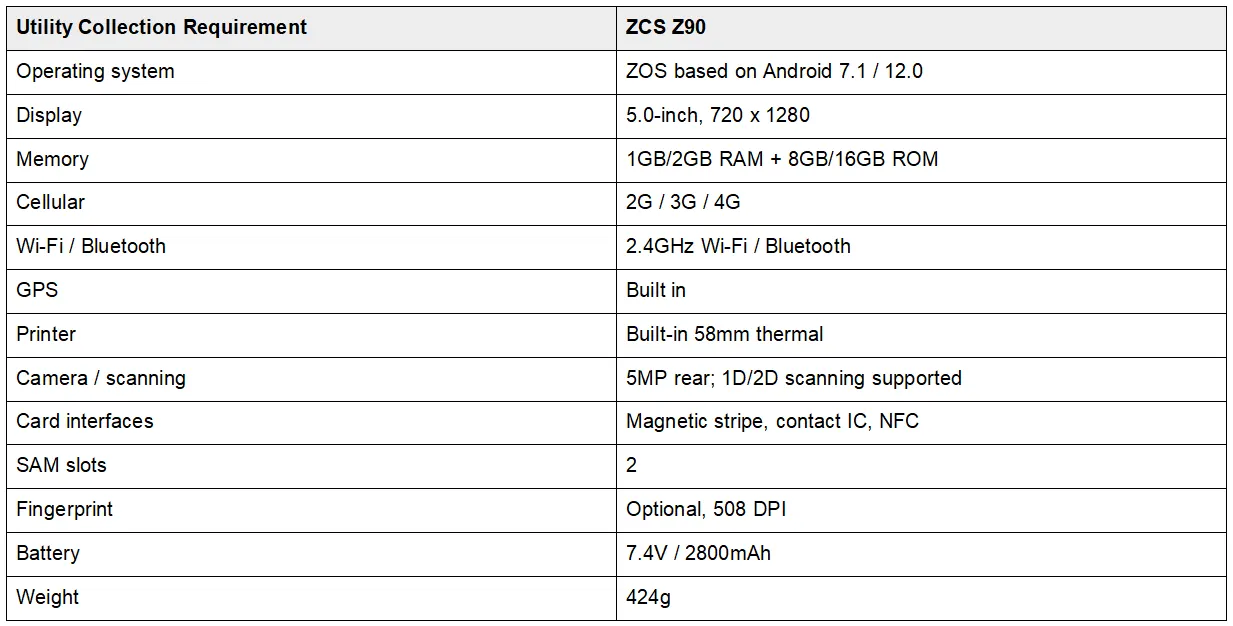
ZCS Z90 represents the handheld Android POS category for field payment and collection applications, combining cellular connectivity, GPS, 58mm receipt printing, card interfaces, scanning and optional biometric hardware in one device. Utility billing, account retrieval, offline transaction control and reconciliation still require project software and backend integration.
The Z90 specification should also be read carefully before a tender freezes the BOM. The current product page contains inconsistent battery marketing text, while the detailed specification table states 7.4V/2800mAh. This article uses the detailed-table value and recommends confirming the production configuration in the purchase specification.
Z90 fits mobile collection better than unattended or specialized metering projects. The handheld form factor, printer, GPS and payment interfaces suit field collectors, doorstep payments, utility agent networks, temporary collection points and mobile public-service payment. A desktop counter, unattended kiosk or dedicated meter-reading device can be a better architecture when the workflow does not require handheld mobility.

A pilot should test the entire transaction chain rather than one successful card payment. Import representative customer accounts, retrieve bills, disconnect the network, take cash and electronic payments, print receipts, restore connectivity, synchronize pending records and confirm that duplicate transactions are blocked. The pilot should also test application updates, scanner accuracy and a full collector shift on battery.
It is a handheld or counter device used to retrieve utility accounts, record or process payment, print a receipt and synchronize the transaction with the central billing platform.
Yes, when compatible utility collection software and backend APIs are integrated. The hardware alone does not contain the utility account database or tariff logic.
Spot billing focuses on meter reading and bill generation. A bill collection POS focuses on accepting payment against an existing customer bill.
The terminal can provide local storage, but safe offline collection depends on application logic for pending transactions, retry, duplicate prevention and later reconciliation.
It can record cash collection, print proof of payment and include the amount in collector reconciliation. Cash itself is not an electronic payment transaction.
Z90 provides Android, 2G/3G/4G, GPS, receipt printing, card interfaces, scanning and optional fingerprint hardware. A complete deployment still requires utility billing software, payment integration and backend APIs.






 Home
Home  Handheld POS vs Handheld Inventory Terminal (PDA): What's the Difference?
