
2026-09-01 Author : ZCS
Key Takeaways
● A canteen POS terminal connects meal checkout with student or employee identification, account balances, pricing rules, payments and transaction records.
● School canteens prioritize student accounts and fast lunch-line processing, while factory and corporate cafeterias often add subsidies, payroll links and shift rules.
● Cashless canteen systems can use NFC/RFID cards, QR codes, prepaid wallets or conventional payment cards, depending on the software and account architecture.
● Android canteen POS hardware should be evaluated for screen usability, customer display, printer integration, peripheral support and centralized device management—not CPU specifications alone.
A canteen POS terminal solves a different checkout problem from a conventional restaurant register. Restaurants mainly identify an order; institutional cafeterias often need to identify both the order and the person receiving it. A school, factory or corporate canteen may therefore process identity -> entitlement -> meal -> subsidy -> payment -> record in a few seconds during a concentrated lunch rush. Buyers comparing the broader category can start with ZCS's all-in-one food-service POS guide, then apply the canteen-specific requirements below.
A canteen POS terminal is a countertop or tablet-based checkout device used in institutional food-service environments to identify diners, record meals, apply account or subsidy rules, accept payment and send transaction data to a canteen management system. The terminal is the hardware layer; account logic, menu rules, entitlements and reporting normally belong to the application and backend.
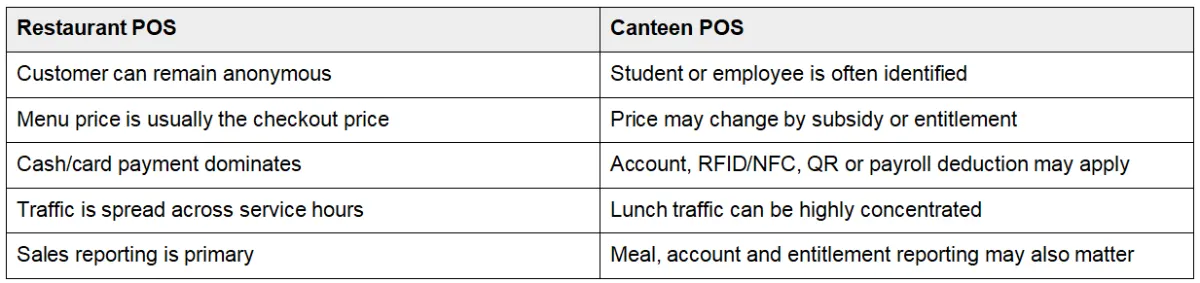
● Identify the diner. The system may use a student ID, employee badge, RFID/NFC card, QR code, PIN or account search.
● Load the account or entitlement. The application checks stored balance, meal allowance, employer subsidy, discount level or daily eligibility.
● Enter the meal. The cashier selects items on the touchscreen or scans predefined menu codes.
● Apply the correct price. Software calculates the diner-specific charge instead of assuming one public price.
● Complete payment or deduction. The transaction may use a prepaid account, subsidy balance, payment card, QR wallet or cash.
● Display or print confirmation. The terminal can show the amount to the diner and print a receipt, kitchen ticket or meal voucher.
● Synchronize records. The backend receives meal counts, account changes, device activity and reporting data.
This workflow explains a common procurement mistake: a POS machine can read a credential, but the credential has no business meaning until software interprets it. Reading an employee NFC badge does not automatically reveal whether the employee has already used a lunch allowance or belongs to the night shift.
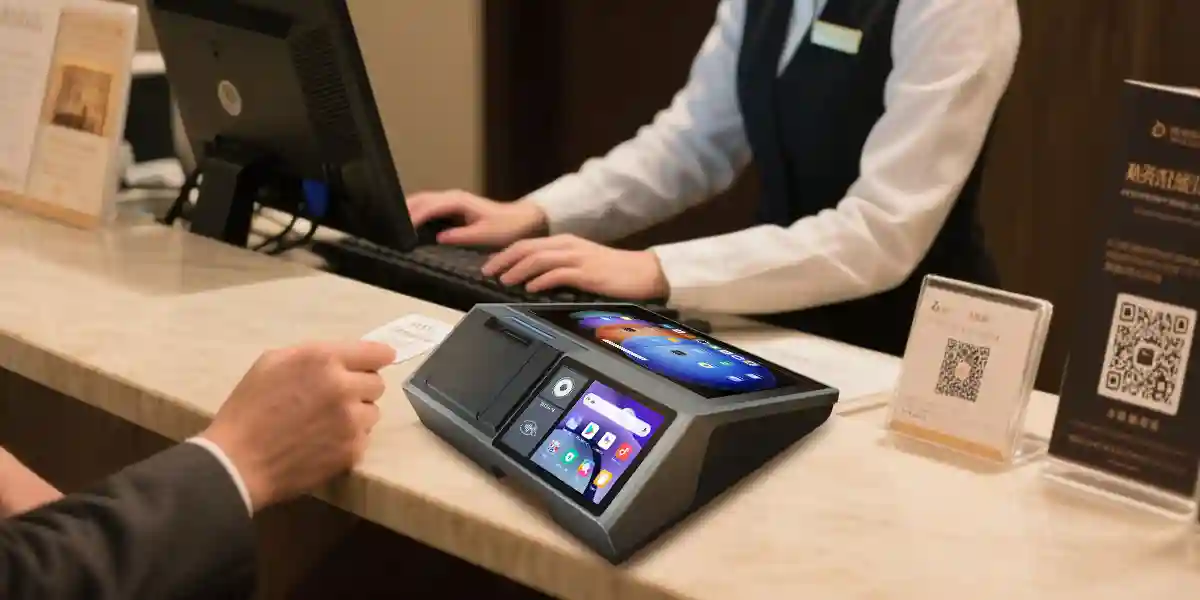
School cafeteria checkout is dominated by identity, account control and a very short service window. A school canteen POS system may link a student ID or PIN to a prepaid balance, meal plan, spending limit or eligibility rule. Hardware priorities therefore include a responsive screen, quick ID input, a clear customer-facing confirmation display and reliable operation when hundreds of students arrive within the same lunch period.
Factory canteens add shift logic and employee subsidies to the checkout problem. A factory canteen POS system may need to recognize employee badges, apply one meal allowance per shift, separate contractor pricing and synchronize multiple counters. A 2,000-worker plant does not necessarily need a more complicated restaurant POS; it needs a faster identity-and-entitlement workflow with predictable peak throughput.
Corporate cafeterias often combine employee accounts with guest and conventional payment flows. The POS may display remaining meal credit, accept a company subsidy, charge guests at full price and send consolidated reports across several offices. The hardware should support those interfaces without assuming that every diner uses the same payment method.
Screen size matters because lunch-line speed is a user-interface problem. A larger Android POS for canteen deployments can show more menu buttons with fewer page changes and larger touch targets. Buyers should test how many taps a common meal order requires, not just compare display size.
A second display reduces ambiguity at the counter. The diner can see selected items, charge amount, account balance, identity confirmation or payment state while the cashier continues operating the main screen. Buyers considering this architecture can compare the broader hardware trade-offs in ZCS's dual-display Android POS guide.
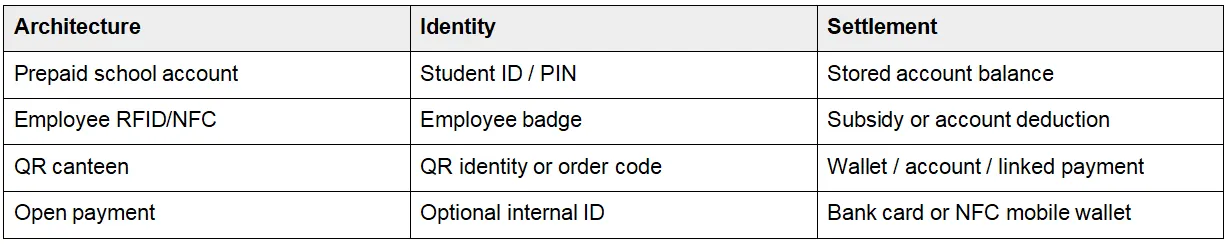
Cashless identification and contactless payment must be separated during specification. A school RFID card or employee NFC badge can simply identify an internal account; a bank card or NFC mobile wallet is a payment instrument. EMVCo defines EMV Contactless for contactless chip cards and NFC-enabled mobile devices and maintains approval processes for payment acceptance devices. EMVCo's contactless specifications therefore matter when a cashless canteen POS terminal processes open payment, not merely when it reads an internal staff card.
A cashless canteen POS terminal can use closed-loop RFID/NFC identification, QR credentials, prepaid accounts or open-loop payment cards. The reader captures the credential; the canteen application determines account ownership, meal eligibility, subsidy rules and the amount to deduct.
Printer choice should follow the document workflow. A 58mm printer suits short receipts and meal vouchers, while 80mm printing gives more room for detailed receipts or kitchen order tickets. High-volume counters should test roll replacement, heat buildup and actual speed under continuous use.
Ports become a bottleneck when a canteen counter adds scanners, readers, cash drawers, kitchen printers or payment devices. Procurement teams should count every peripheral that must run simultaneously and confirm the required interfaces before approving the final configuration.
A ten-minute network failure at 12:05 can disrupt an entire lunch rush. The software should define cached menus, queued transactions, reconnect behavior, duplicate prevention and reconciliation. Wi-Fi on a specification sheet does not prove offline capability; offline continuity is mainly an application and backend requirement.
Institutional POS terminals should behave like dedicated business devices rather than general-purpose tablets. Android Enterprise supports dedicated-device provisioning, managed app distribution, remote lock or wipe and policy controls for enterprise fleets. Google's Android Enterprise feature list provides a useful benchmark when a school group, factory operator or catering company needs to manage many Android POS units.
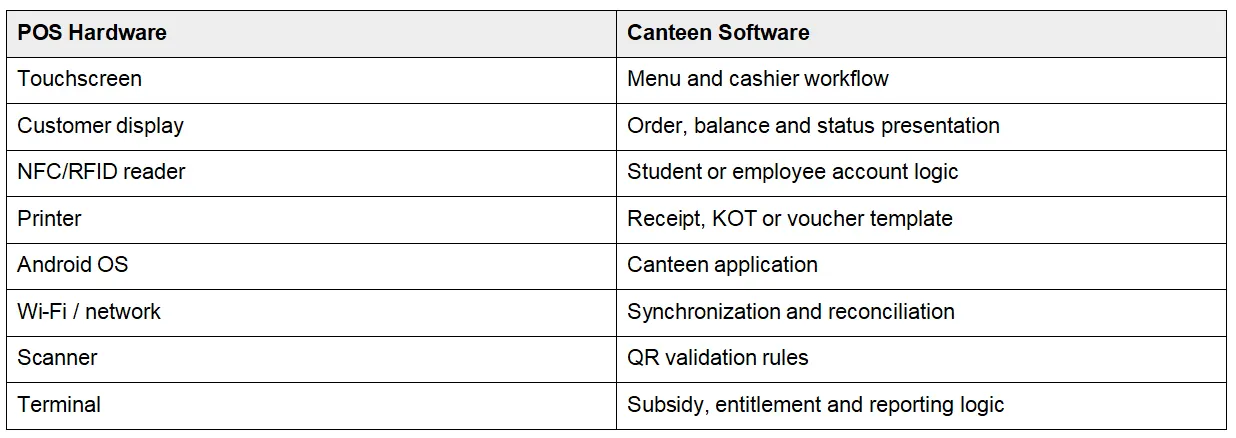
Hardware reads and presents data; software decides what the data means. That separation should be written into the tender. The POS manufacturer can expose printer, display and peripheral interfaces, while the canteen software vendor or integrator implements meal allowances, payroll links, school accounts, pricing, inventory and reporting.
ZCS Z100 fits the fixed-counter side of canteen deployment rather than every institutional food-service scenario. The current Z100 configuration lists Android 14.0, a 10.1-inch operator touchscreen, a 3.95-inch customer display, a quad-core CPU, configurable memory/storage, optional 58mm or 80mm thermal printing, Wi-Fi, Bluetooth and USB. The Z100 product page also lists wall/desktop mounting and OEM/ODM integration.
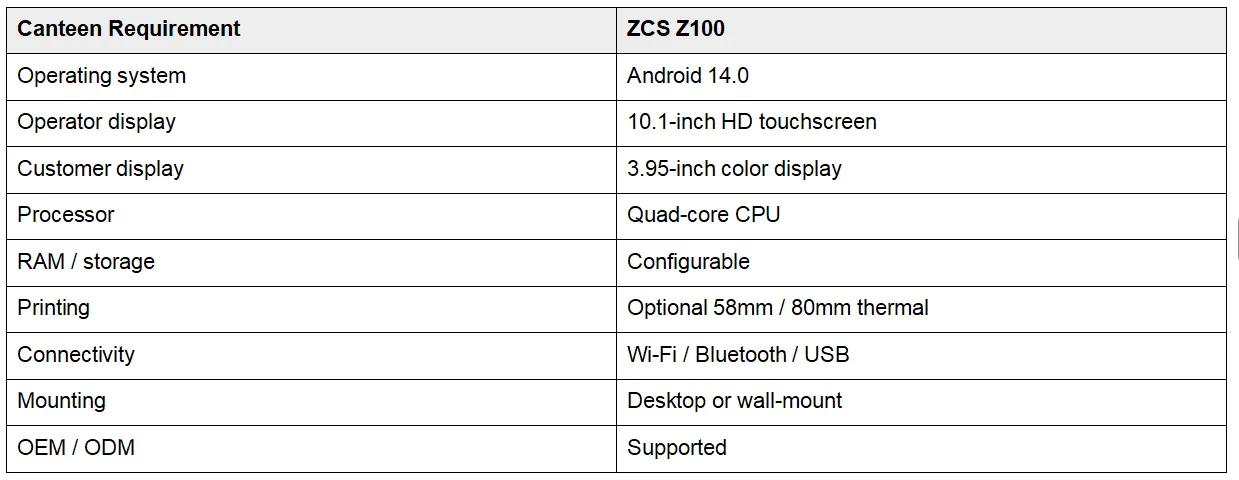
ZCS Z100 is an Android countertop POS hardware platform for food-service and institutional checkout applications, combining a 10.1-inch operator touchscreen, 3.95-inch customer display, Android 14, optional 58mm/80mm thermal printing and peripheral integration. Student databases, HRMS links, payroll deductions, meal subsidies and entitlement rules still require the appropriate canteen software.
Fleet management is another relevant Z100 capability. ZCS lists software pre-installation, remote upgrades, centralized management, hardware-status monitoring, operation logs and an app domination mode that can automatically launch a specified application and prevent unauthorized closure. Integrators requiring deeper application control can also review the ZCS Android POS SDK and ODM guide.
A fixed dual-screen terminal is not automatically the best canteen architecture. Z100-style hardware fits permanent serving counters, school cafeterias, factory dining halls and corporate food courts where staff work from a stable checkout position. A handheld POS can be better for mobile meal carts, temporary stations, outdoor catering or queue-busting staff who need to move through the dining area.

● Measure peak transactions per minute, not only meals per day.
● Define student, employee or guest identification before selecting readers.
● Document subsidy, meal-plan and pricing rules before hardware integration.
● Confirm whether closed-loop NFC/RFID, QR or open payment is required.
● Choose 58mm or 80mm printing based on receipt and kitchen workflow.
● Count every scanner, reader, printer and peripheral that must run simultaneously.
● Test network loss, queued transactions, reconnect and reconciliation.
● Confirm dedicated-device or kiosk management for multi-terminal deployments.
● Run a pilot during a real lunch rush before bulk ordering.
A canteen POS terminal is the checkout hardware used in a school, factory or corporate cafeteria to enter meals, identify diners, accept or record payment and send transaction data to the canteen system.
Canteen systems often add person-specific accounts, meal entitlements, subsidies, payroll or prepaid balances to the normal order-and-payment workflow.
Yes. A cashless canteen can use prepaid student accounts, employee RFID/NFC badges, QR credentials, conventional electronic payments or a combination of those methods.
No. NFC is common, but QR codes, barcodes, PINs or other credentials can identify the diner. The correct reader depends on the chosen account and payment architecture.
Yes, provided the canteen application supports the Android version and can access the required printer, display, scanner, reader and network interfaces.
No. Z100 is a POS hardware platform. Student or employee databases, meal subsidies, payroll links, entitlement rules, inventory and reporting require compatible software and backend integration.






 Home
Home  Utility Bill Collection POS Terminal: How to Choose Hardware for Field and Agent Payments
