
2026-08-20 Author : ZCS
Tap to Pay turns a phone into a payment acceptance device. It doesn't turn a phone into a checkout counter. That distinction is where most merchants who start with Tap to Pay eventually run into a wall — payment acceptance was never the hard part of running a register; receipts, cash handling, and a device that survives a full shift are. This guide covers what Tap to Pay actually does well, where it falls short for a real counter, and what a hybrid Android POS terminal adds for merchants who need both software-based payment acceptance and full checkout functionality in one device.
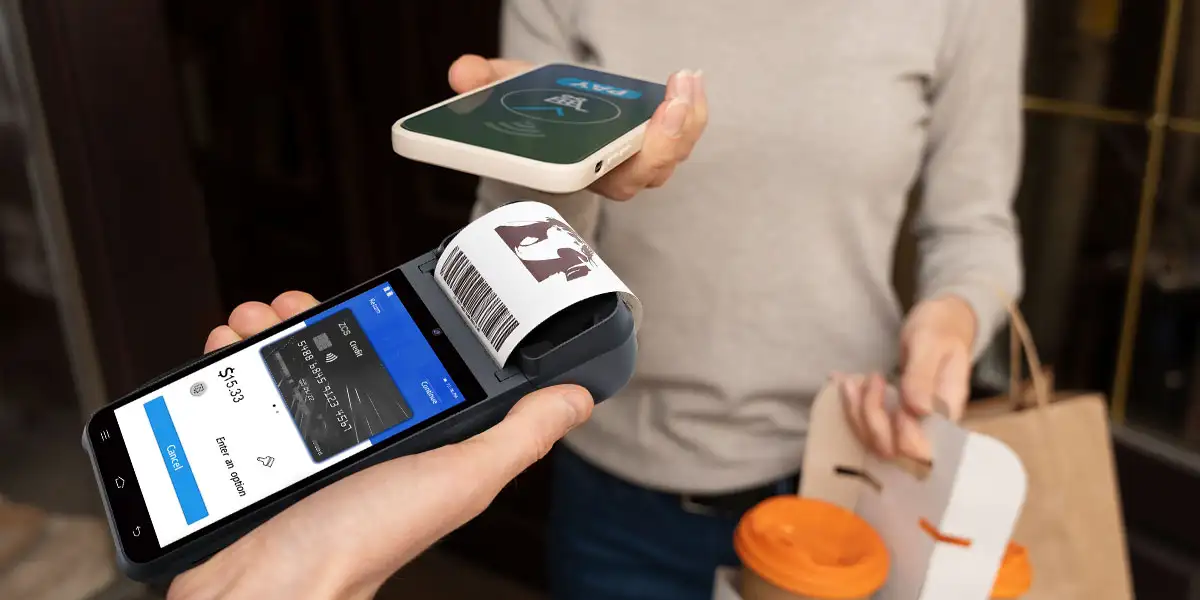
Tap to Pay gets a merchant accepting cards fast. Setup takes minutes on a phone the merchant likely already owns, with no separate hardware purchase required.
Tap to Pay works well for occasional or mobile selling. A pop-up stall, a one-off market day, or a service provider taking the occasional in-person payment doesn't need — and shouldn't pay for — a full register setup.
Upfront cost is close to zero. There's no terminal to buy when the acceptance device is a phone the merchant already carries every day.
Battery life becomes a real constraint under continuous use. A phone running a payment app, a screen-on display, and constant NFC activity all day drains faster than a terminal built with a larger battery specifically for extended commercial use.
There's no built-in receipt printing. Tap to Pay handles the payment step only — a merchant who needs a physical receipt has to add a separate printer, which means managing a second device alongside the phone rather than one integrated unit.
There's no cash drawer integration. Phones don't have the physical port a cash drawer trigger connects to, which matters for any merchant still handling cash alongside card payments, not just card-only businesses.
Commercial durability isn't part of the design. A consumer phone isn't built for the drops, spills, and constant handling that happen at a real counter the way a commercial-grade terminal is, and a cracked screen or water-damaged phone is a bigger operational problem when it's also the only payment device.
A hybrid Android POS terminal keeps the same software-based payment acceptance Tap to Pay relies on — NFC and Host Card Emulation running through a certified Android device — while also functioning as a complete register. The distinction isn't payment technology; it's what surrounds it.
Built-in receipt printing removes the second-device problem entirely. A terminal with an integrated thermal printer handles the payment and the receipt in one motion, without a merchant juggling a phone and a separate printer during a rush.
Cash drawer connectivity keeps cash handling in the same workflow. A terminal with the right port support triggers a connected cash drawer directly, rather than requiring a completely separate cash-handling process alongside card payments.
Commercial-grade battery and build quality are designed for a full shift, not a phone's typical daily use pattern. A terminal built for continuous retail or food service use is rated for the kind of handling a checkout counter actually involves.
Manually handling receipts becomes a bottleneck once transaction volume grows past occasional sales. Printing separately, texting a digital receipt, or skipping receipts altogether all become worse tradeoffs as volume increases.
Staff juggling a phone, a separate printer, and a separate cash drawer signals a workflow problem, not just an inconvenience. Every additional disconnected device adds a point of failure and a step that slows down checkout.
A phone dying mid-shift is a bigger warning sign than it first appears. If battery life is already a daily concern, the underlying hardware wasn't built for the volume the business now runs.
Physical damage to the payment device stops being a rare accident and becomes a recurring cost. A dropped or cracked phone that's also the only payment acceptance tool creates real business disruption every time it happens.
Screen size and configuration affect how a hybrid terminal actually performs at a counter, not just how it looks. Our guide on what to look for in a POS system with a touch screen covers the practical differences between single-screen and dual-screen setups, and where each fits a real checkout workflow.
Merchants moving from phone-only Tap to Pay to a full terminal often over-index on processing power alone, when software compatibility and room to scale matter just as much. Our breakdown of hardware power, software compatibility, and scalability as competing priorities walks through how to weigh these three factors against each other for a specific business rather than defaulting to whichever spec looks most impressive on paper.
Moving from Tap to Pay to a dedicated terminal is really a subset of a bigger hardware decision. For merchants ready to evaluate the full range of options — not just Tap to Pay's replacement, but the complete terminal selection process — our complete Android POS system selection guide is the right starting point, covering the broader set of criteria beyond the payment-acceptance question this article focuses on.

Q1. Can a hybrid Android POS terminal still accept Tap to Pay-style contactless payments?
Yes. The underlying NFC and Host Card Emulation technology is the same — a hybrid terminal doesn't replace software-based contactless acceptance, it adds receipt printing, cash drawer support, and commercial-grade durability around it.
Q2. Is Tap to Pay ever the better choice over a dedicated terminal?
For occasional or mobile selling with low transaction volume and no need for printed receipts or cash handling, Tap to Pay on a phone the merchant already owns is often the simpler, lower-cost option.
Q3. Does switching to a dedicated POS terminal mean giving up the flexibility of a phone-based system?
Not necessarily — many Android POS terminals run the same open software environment a phone does, including the ability to install additional apps, while adding the physical functionality a phone lacks.
Q4. How much does battery life actually differ between a phone and a commercial POS terminal?
Commercial terminals are generally built with larger batteries designed for continuous, all-day use under constant screen activity and NFC use, which is a different design target than a phone's typical daily usage pattern.
Q5. What's the first sign a business should move beyond phone-only Tap to Pay?
Needing a physical receipt regularly or handling cash alongside card payments are usually the earliest signs, since both require adding separate hardware anyway — at which point a hybrid terminal consolidates what would otherwise be multiple disconnected devices.






 Home
Home  After payabl.'s Tap to Pay: What's Next for POS Hardware
