
2026-11-23 Author : ZCS
An RFID POS terminal combines tag reading and writing with the screen, application, connectivity and printing functions of a smart POS. ZCS applies this architecture to the fixed Z100 and portable Z92 so stores can identify an RFID-enabled item, retrieve its business record and update inventory from the same device.
The complete RFID technology guide explains frequencies, tags, RFID vs NFC and barcode differences. This article focuses on how Z100 and Z92 apply RFID inside a POS workflow for jewelry, smart retail, inventory and asset tracking.
An RFID POS terminal is a business device that reads a compatible RFID tag or card and sends the identifier to a POS, inventory, access or enterprise application. The device can also include a touchscreen, barcode scanner, printer, network connection and other card interfaces.
The term covers several different designs:
| RFID POS design | Main function | Typical application |
|---|---|---|
| Integrated HF RFID POS | Reads supported 13.56 MHz cards through the POS hardware | Staff cards, loyalty, tickets and local identification |
| Customized UHF RFID POS | Reads item or asset tags through a project-specific module and antenna | Apparel, warehouse and factory tracking |
| Fixed RFID workstation POS | Combines RFID, scanning, a large touchscreen and multiple ports | Jewelry, checkout, stock management and asset records |
| Portable RFID POS | Combines mobile connectivity, RFID and barcode input | Stock checks, shelf verification and mobile asset tracking |
RFID support is not one universal feature. A 125 kHz ID card, a 13.56 MHz MIFARE card and a UHF apparel tag require different radio hardware and protocols. ZCS defines the frequency, interface and terminal configuration from the business process the device must support.
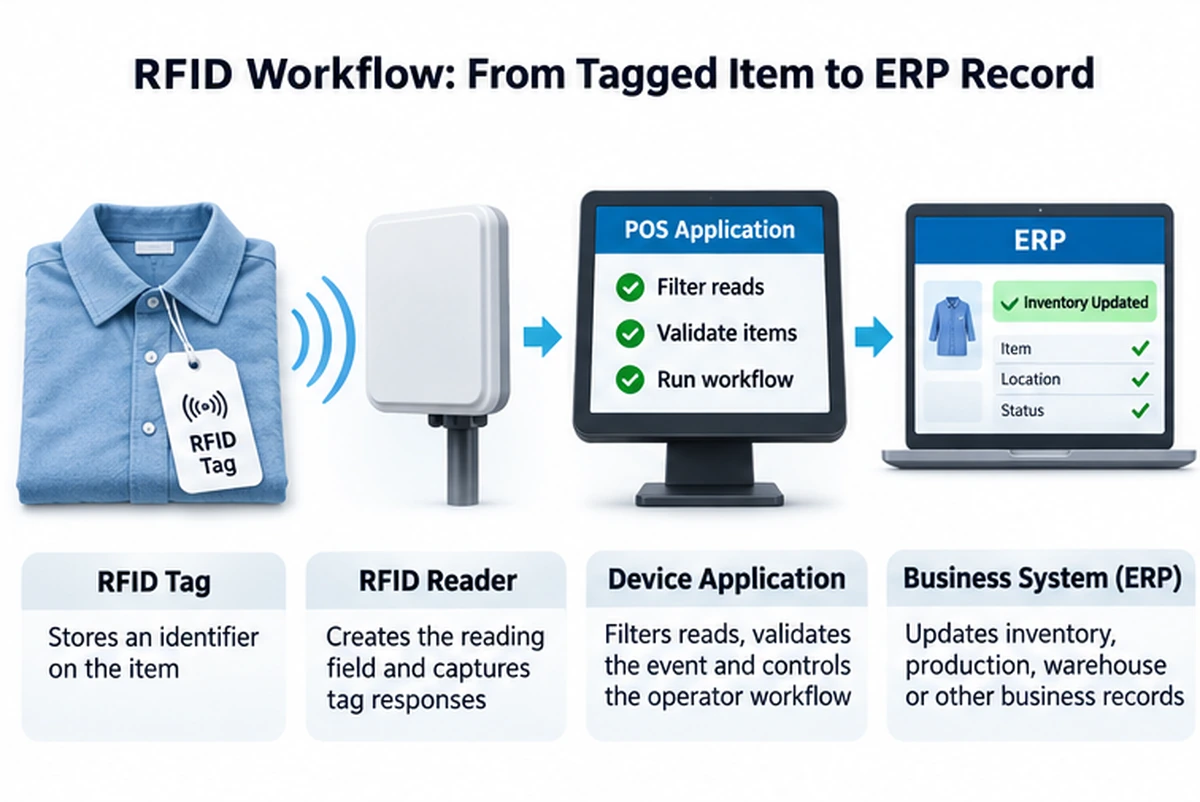
ZCS supports RFID POS projects at three levels.
ZCS uses Android POS terminals as the physical base for RFID projects. The selected platform supplies the touchscreen, processor, network connection, printer, ports and enclosure needed at the work station. Z100 suits fixed counters and inventory stations, while Z92 supports portable work inside the store or warehouse.
ZCS integrates the selected RFID module and antenna with the Android POS, barcode scan head, printer, camera, USB devices, serial interfaces and network connections. The result is one operator station that reads the item, validates the process and shows the result on the same device.
ZCS configures RFID hardware, device firmware and application behavior around the customer's process. A factory project can use RFID for normal item identification, barcode scanning for labels and exceptions, and ERP for the authoritative production record.
This structure lets the customer select only the capabilities the workflow needs. A short-range staff-card project does not require the same antenna, enclosure or event logic as a UHF inventory station.
The Z100 Android tablet POS provides a fixed platform for RFID-enabled retail, jewelry and asset-management applications. Its 10.1-inch operator screen gives staff room to view product details, tag status, stock records, item images and transaction prompts.
Z100 combines Android software, a 10.1-inch touchscreen, integrated receipt printing, barcode and QR scanning, wireless connectivity and multiple peripheral ports. Supported card configurations include NFC, IC, magnetic stripe, ID and PSAM functions. The RFID-enabled configuration adds tag reading and writing to the installed retail or inventory application.
Z100 turns RFID data into a visible store operation. A jewelry associate can present a tagged item, retrieve its product record, confirm the description or authenticity data, update its location and continue to checkout without moving to a separate reader or computer.
Z100 fits projects that need:
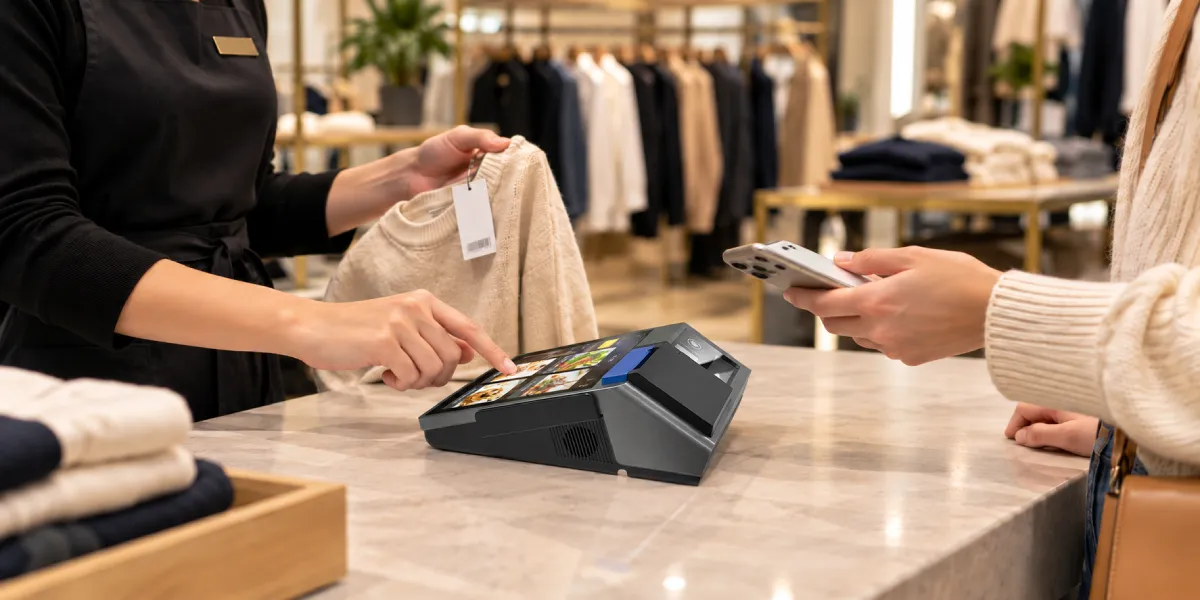
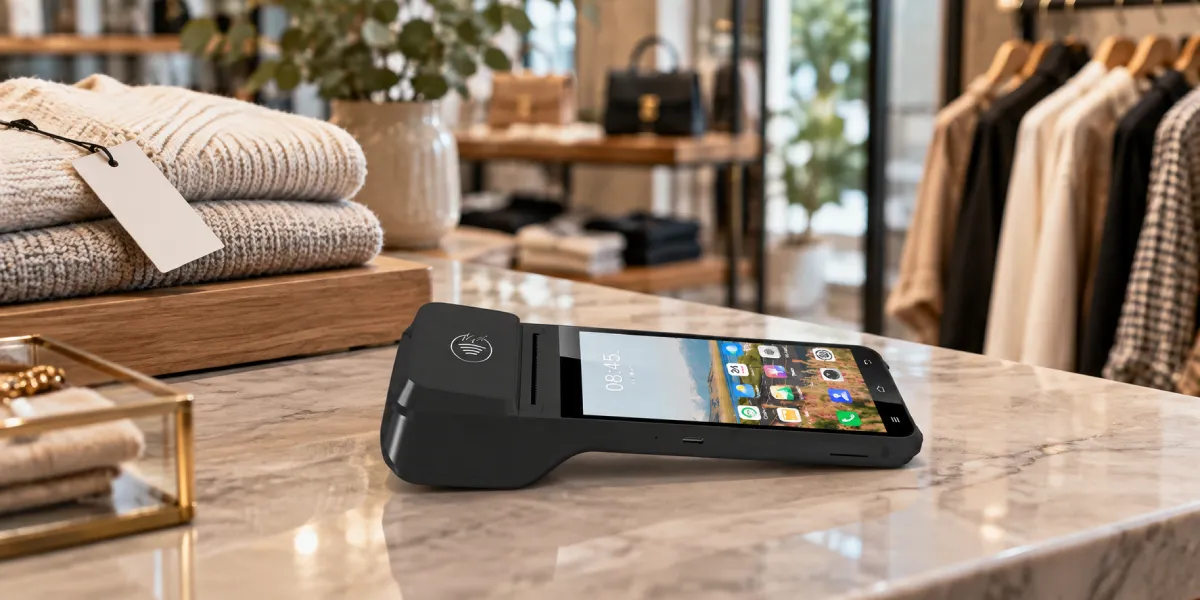
The Z92 Android POS terminal supports mobile RFID work across the sales floor, stockroom and receiving area. Its handheld form lets staff identify an item and update the business system without carrying the product back to a fixed checkout counter.
Z92 combines a 5.5-inch touchscreen, Android-based software, a built-in 58mm thermal printer, 4G, dual-band Wi-Fi, Bluetooth, GPS and optional professional scanning. Its supported NFC interface covers ISO/IEC 14443 A and B, MIFARE and FeliCa media. The RFID-enabled project configuration connects tag reading and writing with the installed inventory or asset application.
Z92 coordinates RFID, barcode scanning and mobile data entry in one handheld workflow. A member of staff can read a product tag, scan a printed code when required, check the item status, update its location and print a label or transaction record from the same terminal.
Z92 fits cycle counts, shelf verification, receiving, asset inspections and mobile checkout. The selected RFID frequency and tag protocol remain part of the project configuration; ISO/IEC 14443 close-range reading and UHF batch inventory use different hardware arrangements.
Z100 and Z92 connect a physical RFID tag with the product or asset record stored in business software. The POS reads the tag identifier, sends it to the installed application and displays the associated item, stock or ownership information.
RFID gives each tagged jewelry item a digital identity inside the POS system. Z100 can display the item name, model, material, price, image, certificate reference and current store location after the tag is read. The same workflow supports item verification during checkout, returns, transfers and stock counts.
Jewelry stores can use the RFID POS terminal for:
An RFID smart POS terminal reduces repeated manual product entry. Z92 can carry the inventory application to the shelf or stockroom, while Z100 provides a fixed station for checkout, receiving and inventory review.
The application can connect each successful tag read with a stock event such as received, counted, transferred, reserved, sold or returned. This structure gives the retailer a current item history instead of a disconnected list of tag numbers.
RFID writing allows the project application to associate supported tags with a new asset or business record. Staff can use Z100 at an asset-control desk or Z92 during a physical inspection to identify the asset, display its assigned department or location and record the latest event.
An asset workflow can combine:
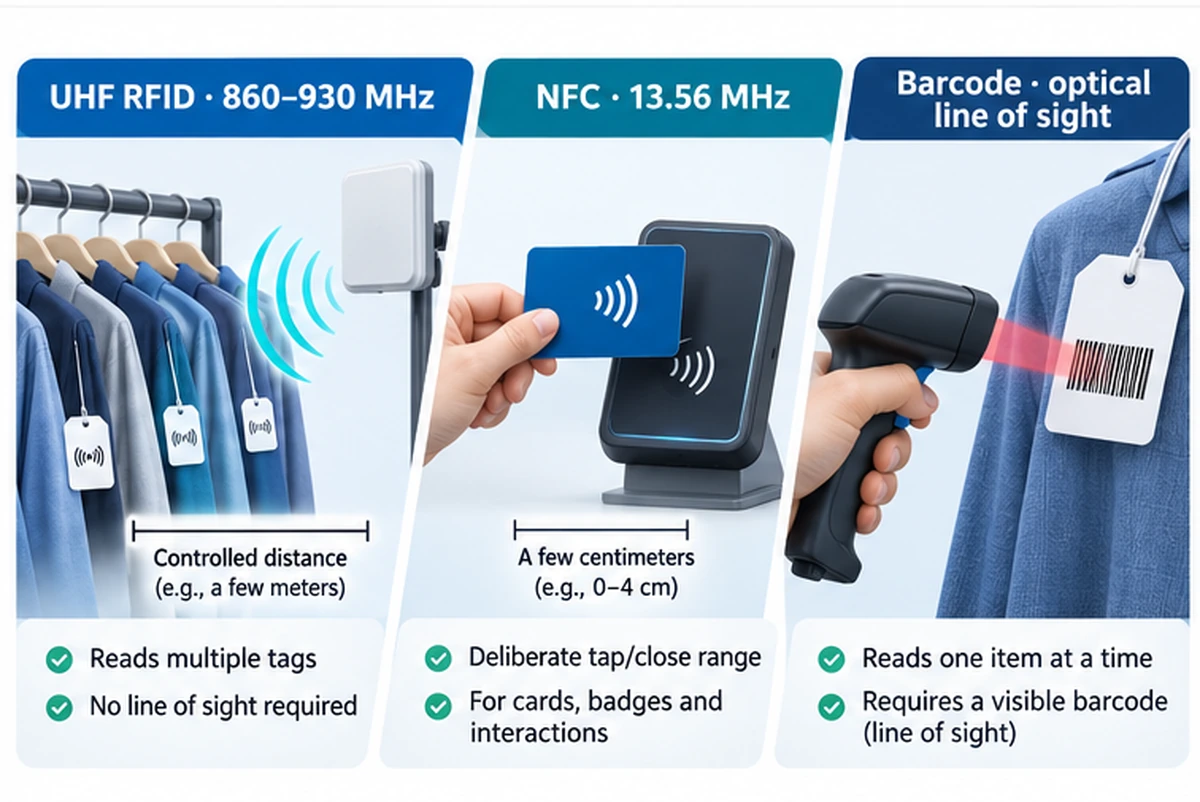
GS1 explains that passive UHF RFID normally operates in the 860–930 MHz band and supports rapid asset identification, inventory and tracking. Its RFID frequency band overview distinguishes this architecture from 13.56 MHz HF and NFC systems.
The tag and reading method must match the intended count. Close-range ISO/IEC 14443 tags suit deliberate one-item interactions. A project that must capture many tagged products together uses a dedicated UHF reader and antenna configuration connected to the POS application.
ZCS delivered a customized RFID and barcode POS solution for a large garment manufacturer serving a global retail supply chain.
The device combined:
The device converted every physical read into a controlled production event. When the operator presented a tagged item, the POS captured the identifier, checked the expected record and displayed the next action. The barcode scanner handled labels or fallback cases. The application then sent the approved event to ERP.
The data flow followed this sequence:
RFID or barcode input → device validation → operator result → structured ERP event → synchronized production record
The ERP event could contain the item identifier, station, timestamp, work order, status and exception result. Unique event IDs prevented a repeated tag observation from becoming a duplicate production update.
This project demonstrates ZCS's main RFID capability: combining hardware identification with software workflow and enterprise integration. The value did not come from adding a reader alone. It came from making RFID, scanning, the operator screen and ERP behave as one production tool.
RFID and barcodes solve different identification problems inside the same POS.
| Input | Strength | Role in a combined ZCS device |
|---|---|---|
| RFID | No optical line of sight and rapid tag detection | Normal item, bundle or asset identification |
| Barcode scanner | Precise selection of one visible printed code | Labels, fallback, packaging and exceptions |
| Touchscreen | Shows status and collects operator choices | Confirmation, error handling and workflow control |
| ERP connection | Applies enterprise rules and stores the record | Work orders, inventory, production and audit history |
The application decides which input is valid at each step. A tag read can start a transaction, a barcode can confirm a label, and the operator can resolve a mismatch on screen. The device should not accept every input as interchangeable data.
ZCS connects the RFID application to ERP through the interface defined by the customer system. The POS application filters raw reads, creates a business event and sends that event through an API, local service or controlled synchronization layer.
A production event normally includes:
The integration can also download master data and active work instructions from ERP. This allows the POS to reject an unexpected item, show the correct process step and continue a controlled local workflow during a temporary network interruption.
Projects that exchange standardized supply-chain events can map their data to the GS1 EPCIS visibility standard. EPCIS defines a shared structure for recording what object was involved, when the event occurred, where it happened and why it matters to the business process. ZCS can produce the required application event while the customer's integration layer applies the selected enterprise data model.
ERP remains the source of truth. The RFID POS captures and validates events at the physical station. ERP maintains the authoritative production, inventory or asset record.
For inventory projects using later forecasting and replenishment, the RFID events must remain tied to clean item and location records. The article on AI inventory management explains how POS, ERP, warehouse and supplier data feed broader stock decisions.
ZCS supports RFID POS development through product SDKs, hardware interfaces and project engineering.
Depending on the selected reader and terminal, integration can use:
The ZCS technical support centre provides SDK, TMS, development and OEM/ODM support for POS and card-reader projects.
The project deliverables can include the selected hardware configuration, integration documents, sample code, customized application behavior and production deployment support. Software providers can build their own application on the ZCS platform, while enterprise customers can define the complete station workflow with ZCS engineering.
No. RFID is a broad identification technology family, while contactless payment uses specific card protocols, payment applications, security keys and approvals. A terminal that reads a 13.56 MHz membership card does not automatically process an EMV contactless bank-card payment.
NFC uses 13.56 MHz and is designed for close interaction with compatible phones, cards, tags and readers. The NFC Forum technical overview describes its typical range as up to about two centimetres.
An RFID POS project should name the required function:
Each function uses its own application rules. Payment acceptance additionally requires merchant acquiring, an approved payment application and the relevant terminal configuration.
| Project | Recommended ZCS architecture | Why it fits |
|---|---|---|
| Jewelry checkout and inventory desk | RFID-enabled Z100 POS | Large touchscreen, fixed placement, product lookup and printing |
| Mobile stock or asset inspection | RFID-enabled Z92 POS | Handheld operation, scanning, printing and wireless connectivity |
| 13.56 MHz item or credential workflow | Z100 or Z92 with compatible RFID configuration | Deliberate close-range reading and writing inside the POS application |
| High-volume UHF inventory | Z100 or Z92 with project-specific UHF configuration | Dedicated reader, antenna and application filtering |
| Fixed asset-management desk | Z100 RFID POS | Product records, peripheral ports and backend synchronization |
| Store-floor item verification | Z92 RFID smart POS | Portable identification, inventory update and label printing |
The choice starts with the tag and business event, not the product photograph. A project that names the frequency, protocol, reading zone and software action can be matched to a clear ZCS configuration.
ZCS RFID POS customization can cover:
Customization is controlled by one approved project configuration. The tag type, reader, antenna, operating system, scan engine, application and backend interface are defined together so production devices behave consistently.
The Android POS manufacturer checklist provides a wider framework for evaluating firmware, configuration control, SDK ownership, production consistency and lifecycle support.
A useful project brief contains:
This information lets ZCS move directly from a general RFID request to a defined hardware and integration plan.

Yes. ZCS supplies RFID and smart-card readers and builds customized POS terminals that combine RFID, barcode scanning, Android applications and ERP integration.
Yes. RFID-enabled Z100 and Z92 configurations connect supported tag reading and writing with the installed Android business application.
Z100 fits fixed jewelry counters, inventory desks and asset-management stations that need a 10.1-inch screen, printing, scanning and peripheral connections.
Z92 fits portable stock counts, shelf checks, receiving and asset inspections that need RFID, barcode scanning, printing and wireless connectivity.
Yes. ZCS configures the UHF reader, antenna, scan head and Android application around the project's tag protocol, reading zone and backend workflow.
Yes. A customized ZCS POS can use RFID for normal identification and a 1D/2D scan head for visible labels, verification and exception handling.
Yes. The POS application can validate the tag event and synchronize structured records with ERP, WMS, MES or a cloud service through the agreed interface.
No. Contactless payment requires the correct payment reader, application, security configuration, approvals and acquiring service. Generic RFID identification is a separate function.
Z100 and Z92 place RFID identification inside the POS workflow. Z100 provides a fixed platform for jewelry counters, inventory desks and asset-management stations. Z92 supports mobile stock checks, item verification and asset inspections. Both platforms connect tag data with Android business software, scanning, printing and backend synchronization.
The correct ZCS configuration starts with the tag, reading zone and business event. Once those requirements are defined, ZCS combines the reader, POS hardware, software interface and backend connection into one deployable system.







 Home
 How RFID Technology Reads Tags, Connects to ERP and Differs From NFC?

