2026-11-23 Author : ZCS
RFID technology uses radio waves to identify tagged products, assets, cards or containers. The reader detects a compatible tag, retrieves its identifier and sends the result to software. That software can update inventory, verify production, control access or trigger another business process.
RFID is broader than the close-range technology used for contactless cards and phones. The guide to the role of card readers in contactless payments explains the payment side. This article focuses on RFID identification, RFID vs NFC and the connection between customized POS hardware and enterprise systems.
RFID stands for radio-frequency identification. It is an automatic identification and data capture technology that lets a reader communicate with an electronic tag through radio-frequency fields.
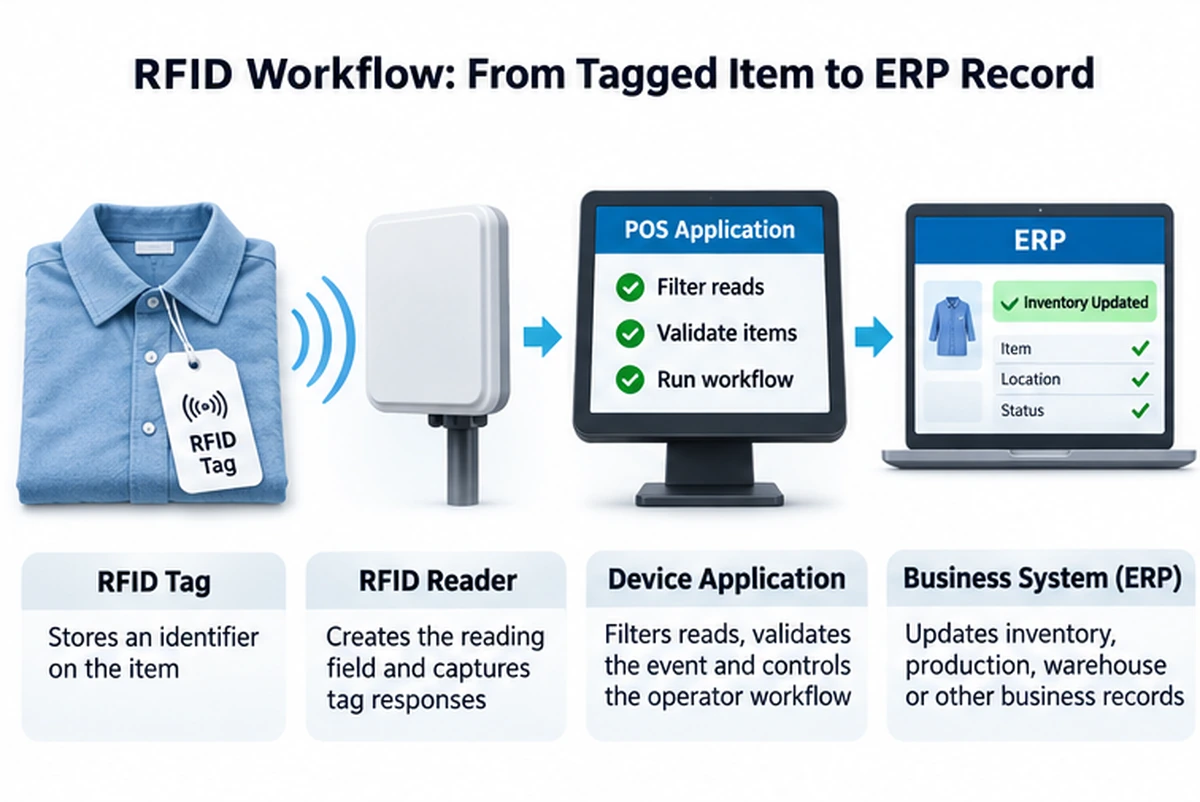
An RFID tag is attached to or embedded in the object being identified. The tag normally stores an identifier and can contain additional data. The reader uses an antenna to create the radio field or receive the tag's transmission. Middleware or an application then interprets the read and connects it to the relevant item, employee, shipment or workflow.
The basic system contains four parts:
| Component | Job |
|---|---|
| RFID tag | Stores an identifier and responds to a compatible reader |
| Reader and antenna | Creates the reading field, detects tags and captures their responses |
| Device application | Filters reads, shows results and controls the operator workflow |
| Business system | Connects the identifier to inventory, production, warehouse or ERP records |
NIST defines RFID as a form of automatic identification and data capture that uses electric or magnetic fields at radio frequencies to transmit information. Its RFID security guidance also separates the radio subsystem from the enterprise software and network behind it.
The tag does not need to contain the full business record. A tag can hold a compact identifier while the ERP stores the product description, order number, production status, owner and history. This keeps the physical tag simple and allows the business record to change without rewriting every field on the tag.
A standard RFID read follows a short sequence:
RFID does not require optical line of sight. A reader can detect a compatible tag even when the printed label is not facing the scanner. This is one of the main differences from a barcode.
The reading zone still needs deliberate design. Metal can reflect radio energy, liquids can absorb it, nearby tags can be detected unintentionally and tag orientation can change performance. Reader power, antenna position, frequency, tag design and the physical environment determine the usable zone.
Passive tags have no battery. They obtain energy from the reader field and respond while inside the supported reading area. Their small size and low unit cost make them common for product identification, apparel, access cards, libraries and supply chains.
Active tags contain a battery and transmit using their own power. They can support longer-range asset location, vehicle identification or sensor applications. The battery, enclosure and maintenance requirements make them larger and more expensive than simple passive labels.
Battery-assisted tags use a battery for internal functions but communicate through a passive-style backscatter link. They are useful when a sensor or memory function needs local power while the system still wants passive UHF communication behavior.
The right tag type follows the operational question. A garment factory identifying thousands of low-cost items needs a different tag from a yard locating reusable containers across a large area.
RFID systems operate in several frequency ranges. Frequency affects the tag design, antenna, reading behavior and common applications.
| RFID type | Typical frequency | Typical operating behavior | Common uses |
|---|---|---|---|
| LF | Around 125–134 kHz | Short range and relatively low data rate | Animal identification, keys and industrial identification |
| HF | 13.56 MHz | Short to moderate range depending on protocol and antenna | Smart cards, libraries, tickets and item identification |
| NFC | 13.56 MHz | Very close, deliberate interaction | Mobile wallets, access, pairing and smart tags |
| UHF / RAIN RFID | About 860–930 MHz | Longer range and rapid reading of many tags | Apparel, inventory, logistics and asset tracking |
| Active RFID | Varies by system | Battery-powered communication over longer distances | Vehicles, containers and real-time asset location |
GS1 explains that passive UHF systems use the 860–930 MHz band and are mainly used for fast asset identification, inventory and tracking. Its RFID frequency comparison lists reading distances up to about 10 metres for suitable UHF environments, while HF systems normally operate at shorter distances.
A published maximum range is not the design target for every installation. A reliable production station often uses a deliberately restricted reading zone so it captures the intended garment or container without reading items at a nearby table.
NFC belongs to the broader RFID family, but an NFC device is not a general-purpose reader for every RFID tag. NFC uses 13.56 MHz and focuses on close, interactive communication. UHF RFID uses a different frequency range, reader design and protocol for inventory and asset identification.
| Comparison | RFID as a broad category | NFC |
|---|---|---|
| Frequency | Can use LF, HF, UHF or other bands | 13.56 MHz |
| Typical distance | From very short to many metres, depending on system | Normally a deliberate tap or a few centimetres |
| Tag volume | Some UHF systems read many tags rapidly | Usually one close interaction at a time |
| Phone support | Phones do not read all RFID types | Widely supported in modern phones |
| User intent | Can detect items automatically in a reading zone | Close proximity signals deliberate action |
| Main applications | Inventory, assets, access, logistics and identification | Payments, access, pairing, digital keys and smart tags |
The NFC Forum describes NFC as a 13.56 MHz contactless technology with a typical operating range up to about two centimetres. Its NFC technical overview also explains that one side can power a battery-free tag during the interaction.
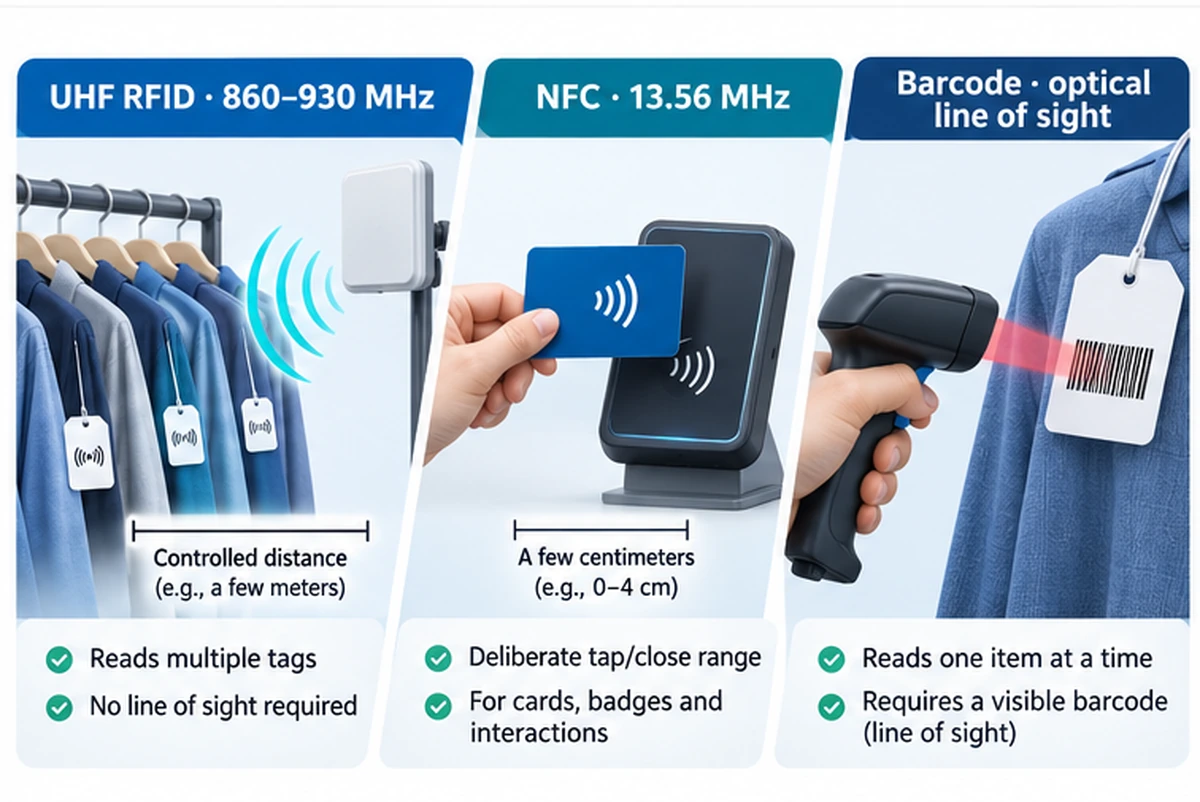
Choose NFC when the person should intentionally bring a card or phone close to the reader. Choose UHF RFID when the business needs to identify inventory at greater distance, read several items quickly or avoid aligning each label with an optical scanner.
The technologies can coexist. A smart POS may use NFC for employee cards or contactless payments while a dedicated UHF module reads product tags. The software must keep those input sources and their business meanings separate.
Neither technology replaces the other in every workflow.
| Requirement | RFID | Barcode |
|---|---|---|
| Line of sight | Not required | Required |
| One or many items | Can read multiple compatible tags | Normally scanned one code at a time |
| Label cost | Higher because the label contains an electronic tag | Very low printed-label cost |
| Human visibility | Identifier usually needs a reader | Printed code can be seen and rescanned easily |
| Read-zone control | Requires antenna and power design | Operator points the scanner at one label |
| Dirty or hidden label | Can still work when the tag remains functional | Damage or obstruction can prevent scanning |
| Integration | Reader filtering and tag-event logic | Scanner sends decoded data to the application |
RFID is stronger for rapid, non-line-of-sight identification. Barcodes are stronger when the operator must select one visible item with minimal infrastructure.
Many manufacturing and retail projects use both. RFID handles normal item movement, while the barcode becomes a fallback for damaged tags, exceptions, packaging labels or processes that already depend on printed codes.
The portable NFC inventory guide shows how mobile terminals can combine tag reading, item management and conventional scanning rather than forcing every task through one input method.
Item-level UHF tags can identify individual garments during production, packing, distribution and store inventory. A serialized identifier distinguishes two pieces of the same style and size instead of representing only the product category.
GS1's case study on item-level apparel tagging describes a garment manufacturer encoding EPC RFID tags with Serialized Global Trade Item Numbers and linking those identifiers to the barcode used at retail.
RFID can associate a product, tray, bundle or work order with a production station. The application records that the identifier reached the station, checks whether the step is expected and reports an exception when the sequence is wrong.
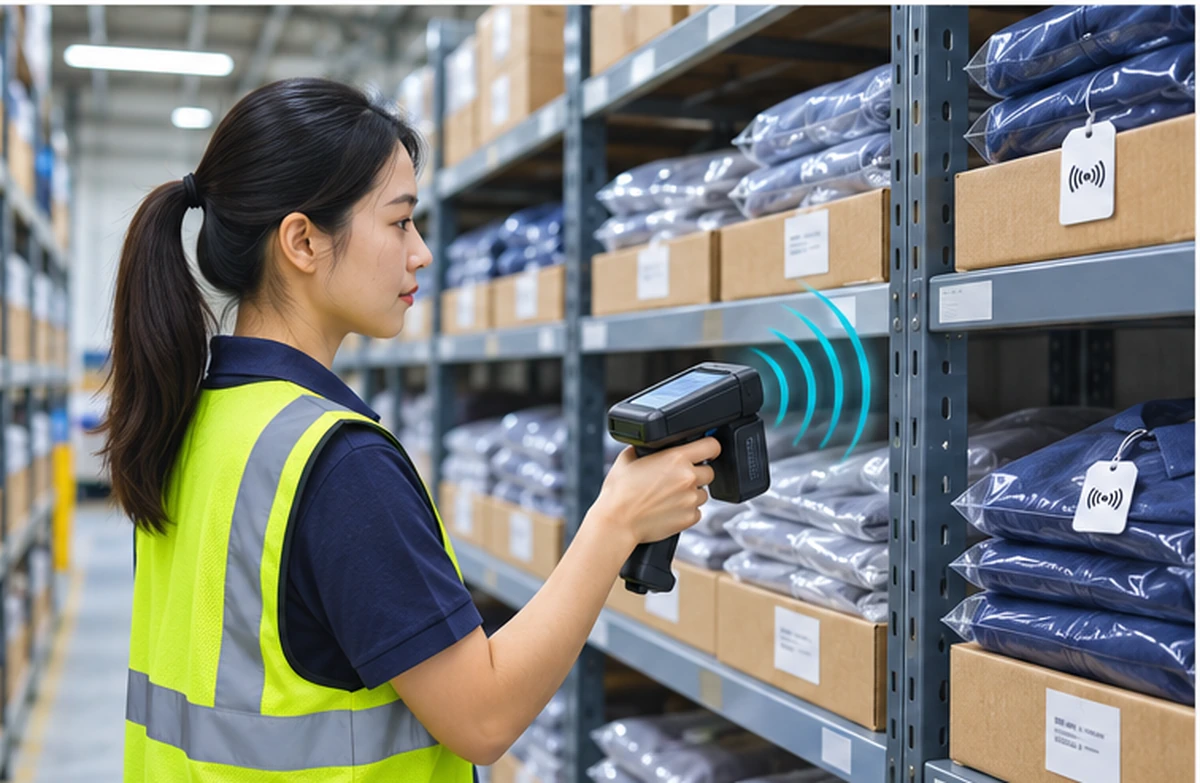
Readers can identify tagged cartons, pallets or reusable containers at receiving, storage, picking and shipping points. Fixed readers support controlled portals, while handheld readers support directed searches and cycle counts.
Businesses can tag tools, equipment, documents or reusable assets. The system records custody, location changes, maintenance events or missing-item alerts.
LF and HF cards are common in access and ticketing. The system reads the credential, checks permissions and records the event. The card identifier alone is not the access decision; the application and backend rules decide whether to approve entry.
ZCS completed a customized RFID POS project for a large garment manufacturer serving an international apparel supply chain. The deployment combined RFID reading, a barcode scan head, a purpose-built POS workflow and ERP connectivity. The customer and location remain confidential.
The operational goal was to turn every tag or barcode read into a controlled ERP event. The device did not act as a standalone reader. It gave factory staff one station for identifying an item, checking the expected production record and sending the confirmed status to the enterprise system.
The workflow followed five steps:
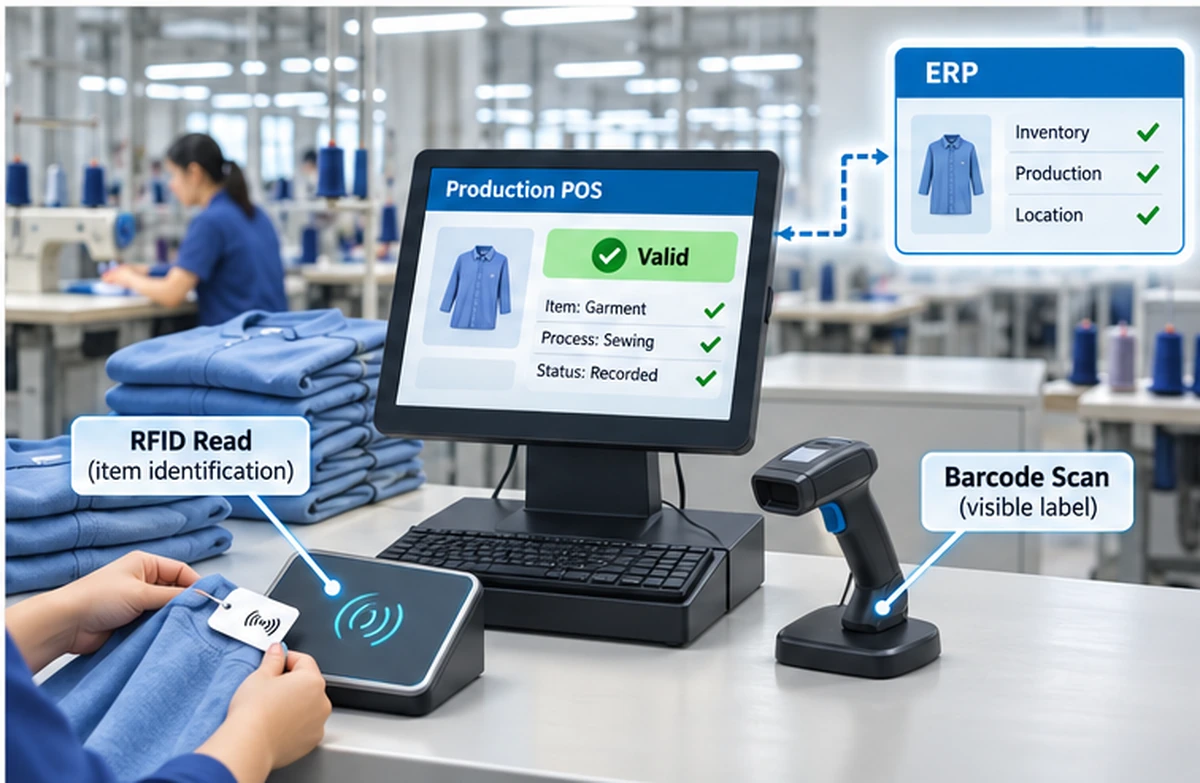
This design shows why RFID projects need more than a reader specification. The reader captures the tag, the POS controls the worker interaction, and ERP remains the authoritative business system.
RFID and barcode input served different jobs inside one device. RFID reduced the need to align every tag with an optical scanner. The scan head preserved compatibility with printed labels and exception workflows. The custom application decided which input was valid at each step.
The integration pattern also applies beyond apparel. A warehouse can connect tag reads to receiving, a service centre can connect assets to maintenance records, and a retailer can connect item identifiers to inventory.
The ERP should receive business events, not an uncontrolled stream of raw tag reads. A reader can detect the same tag many times while it remains in the field. Middleware or the device application must convert those repeated observations into one meaningful event.
A useful event record includes:
The integration should also define offline behavior. A factory device may temporarily lose access to ERP even while local work continues. The application needs controlled storage, unique event IDs and retry logic so reconnecting does not create duplicate production records.
ERP integration requires a source of truth. The device can capture and validate an event, but item master data, work orders and final inventory balances should remain governed by the designated enterprise system.
RFID event history can later support forecasting and replenishment, but identification data and prediction serve different purposes. The article on AI inventory management explains how clean POS and stock data can feed demand forecasts and replenishment decisions.
Some payment cards use radio-frequency communication, but generic RFID reading is not the same as payment acceptance. Contactless card payments commonly use close-range HF technologies and payment-specific protocols, applications, cryptography and certification.
A UHF inventory reader cannot authorize a card transaction merely because both systems use radio waves. Payment also requires:
This distinction matters when specifying a smart terminal. “RFID supported” is incomplete. The requirement should name the frequency, protocol, tag or card type, read distance and intended application.
The guide to NFC and QR restaurant payments provides a practical example of how the customer payment method connects to the POS without turning every radio reader into a payment terminal.
RFID security depends on the application and the value of the protected process. Inventory identification, employee access and payment require different controls.
Common controls include:
A tag identifier should be treated as an input, not proof that the correct business action occurred. The application should confirm location, process state and permissions before changing inventory or production records.
NIST recommends combining management, operational and technical controls for RFID deployments. The correct control set follows the system's purpose, environment and data sensitivity.
Start with the event the business needs to record.
The best RFID design is not the one with the longest theoretical range. It is the one that captures the correct identifier at the correct process point and produces a reliable enterprise record.
RFID technology uses radio waves to identify a tagged object. A reader captures the tag's identifier, and software connects it to an inventory, production, access or asset record.
No. NFC is a close-range 13.56 MHz technology within the broader RFID family. Other RFID systems use different frequencies, readers and ranges.
No. An NFC phone can read supported NFC and compatible HF tags. It cannot function as a general UHF or LF reader without additional hardware.
No. RFID uses radio communication and does not require the reader to see a printed code. The tag still needs to be compatible and inside the designed reading field.
Reading distance depends on frequency, tag, reader power, antenna and environment. NFC normally works within a few centimetres, while suitable passive UHF systems can work across several metres.
RFID is better for non-line-of-sight and multi-item reading. Barcodes are less expensive and give the operator precise control over which visible label is scanned. Many projects use both.
The reader sends the tag identifier to a device application or middleware. That software removes duplicates, validates the workflow and sends a structured event to ERP through an API, service or controlled synchronization process.
Only when the device includes the correct payment reader, payment application, security controls and approvals. Generic RFID support does not provide card-payment acceptance.
RFID technology identifies objects through radio communication and turns those identifiers into business events. LF, HF, NFC and UHF systems solve different distance, speed and interaction problems. NFC is best for close, deliberate taps, while UHF RFID is stronger for inventory and asset identification across a larger controlled zone.
The ZCS garment-manufacturing project shows the complete architecture: RFID captured the item, the barcode scan head supported labels and exceptions, the customized POS guided the operator, and ERP stored the production record. That connection between physical identification and enterprise data is what turns an RFID reader into a working business system.






 Home
 What Are Merchant Services and How Do They Connect Payments, Terminals and Merchant Payouts?

