
2026-10-22 Author : ZCS
POS settlement is the post-approval process that converts an accepted electronic payment into records and funds that can ultimately reach a merchant’s bank account. A point of sale system records the order and payment method, but the checkout success message is only one event in a longer financial chain.
The crucial distinction is between permission to proceed and completed funding.
POS settlement follows an approved payment through capture, clearing and interbank settlement before a processor or acquirer creates the merchant payout. The customer can receive a successful checkout result while those later stages remain unfinished, which is why the bank deposit may appear later.
That sequence explains the common merchant question: “The terminal said approved—where is the money?”
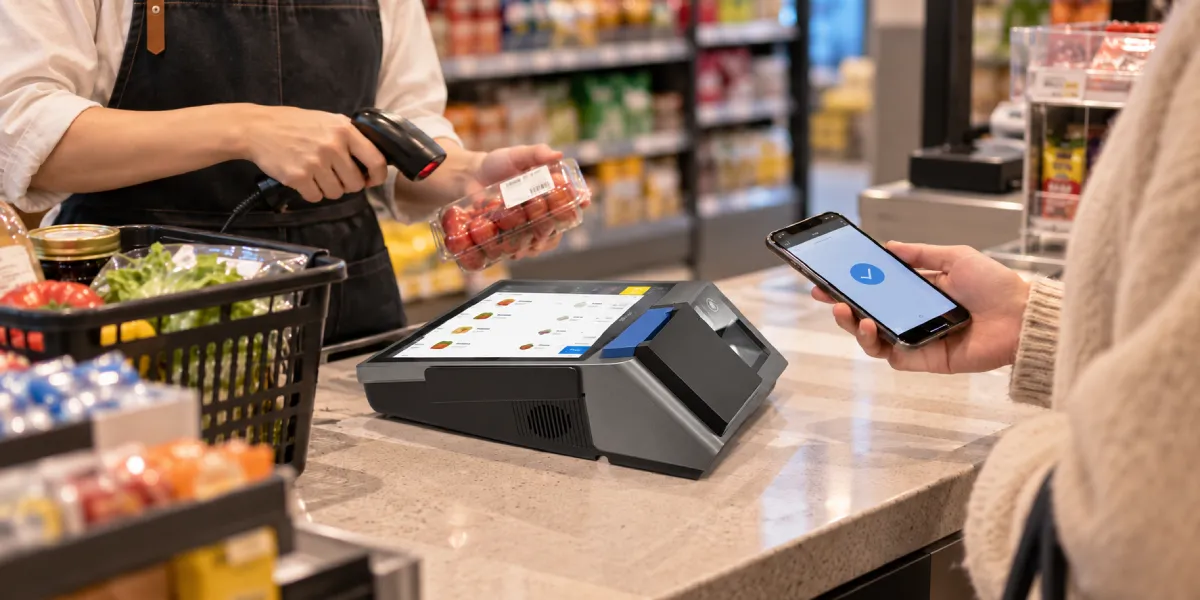
POS settlement is the process of completing the financial and reporting steps that follow an approved point-of-sale payment. In a typical card transaction, the merchant submits or captures the approved sale, transaction details are cleared among the relevant parties, financial positions are settled, and the merchant’s provider later sends a payout.
The word “settlement” can be confusing because providers use it at different levels. A card network may use settlement for transfers between issuers and acquirers. A processor dashboard may label a merchant batch “settled” when the corresponding funds become payable. A merchant may use the same word only when money appears in the business bank account.
These meanings are related but not identical. A useful merchant-facing model separates six events:
Visa’s current VisaNet acceptance documentation illustrates the boundary: its Authorization API requests approval, while a later Capture request initiates clearing and settlement for a previously approved transaction. Exact messages differ across networks and providers, but approval and settlement remain separate functions.
No. An approved payment means the authorization request received a positive response; it does not mean the merchant’s bank account has already been credited. The issuer has decided that the transaction may proceed based on the information and controls available at that moment.
Authorization can confirm factors such as account status, available funds or credit, transaction risk and applicable card controls. It may also place a hold against the cardholder’s available balance. That hold is not the same as a completed transfer to the merchant.
An approved transaction can still require capture. Hotels, rental companies, restaurants with tips and online merchants that ship later may authorize one amount and capture another. Even an immediate retail sale must enter the provider’s clearing and settlement process before it contributes to a merchant payout.
An approved payment can therefore be visible to the customer while the merchant still has no bank deposit. Approval answers whether the purchase may continue. Capture confirms the amount to submit, clearing aligns the transaction record, settlement handles obligations among financial parties, and payout delivers the merchant’s funds.
This is also why a terminal receipt is not sufficient proof of bank funding. Merchants should retain the order reference, payment transaction ID, capture status, settlement batch and payout reference so the same sale can be followed across systems.
The related POS reconciliation workflow explains how to match these records after they exist. Settlement describes how the payment advances; reconciliation tests whether each stage and amount agree.
After approval, the transaction must move from a real-time decision into the provider’s financial processing flow. The exact architecture varies, but the following sequence is a useful operating model.
| Stage | Main event | Merchant evidence | What is not yet proven |
|---|---|---|---|
| Authorized | Issuer approves the request | Authorization code and approved status | Capture, settlement or bank receipt |
| Captured | Final amount is submitted | Capture ID, final amount and timestamp | Clearing acceptance or payout |
| Cleared | Transaction details enter financial exchange | Clearing or batch record | Merchant bank deposit |
| Network settled | Issuer and acquirer positions are calculated and funded | Acquirer or processor settlement record | Provider payout completion |
| Payout created | Provider groups payable merchant funds | Payout ID, net amount and destination | Receiving-bank posting |
| Bank posted | Deposit appears in the merchant account | Bank value date and reference | Nothing further for that payout, subject to later disputes or adjustments |
Capture may happen automatically at the time of sale or later. Some merchants close a terminal batch at the end of a shift or business day; others use a provider that captures and batches transactions automatically. If capture does not occur, an authorization may expire or be reversed without becoming a completed sale.
Clearing sends the final transaction information needed for the issuer and acquirer to post and calculate the transaction. Mastercard describes authorization, clearing and settlement as three core activities: the approval messages, the exchange of financial transaction details, and the exchange of funds on behalf of issuers and acquirers.
Merchant funding occurs after—or is contractually linked to—those processes. The provider can then combine many transactions into one payout, deduct permitted amounts and instruct a bank transfer. The receiving bank may post that transfer on a later date.
A single payment can retain its $100 gross value while contributing only $97.40 to an illustrative net payout. Assume a merchant completes a $100 card sale and the provider deducts a hypothetical $2.60 processing fee. The figures explain the record flow and are not a quoted fee schedule.
| Event | Status or record | Amount |
|---|---|---|
| Customer pays | POS order completed | $100.00 |
| Issuer responds | Authorization approved | $100.00 |
| Merchant submits final amount | Capture accepted | $100.00 |
| Transaction enters batch | Cleared gross payment | $100.00 |
| Provider calculates merchant position | Illustrative processing fee | −$2.60 |
| Provider sends funds | Net payout | $97.40 |
| Merchant bank posts transfer | Bank deposit | $97.40 |
The $2.60 difference is not automatically missing money. It is explained by the provider statement, while the accounting records should normally preserve the $100.00 gross sale and recognize the fee separately. Refunds, chargebacks, reserves or other adjustments could create additional differences in another payout.
Settlement reporting therefore needs both gross and net views. The POS provides the original sale, the processor provides the financial bridge, and the bank confirms receipt of the net payout. A merchant that records only the bank deposit understates sales whenever fees are deducted before funding.
Reliable POS sales reports should preserve order amount, tender, refund and transaction references. They do not replace the settlement report, because the POS usually does not own every fee, reserve or payout event applied by the payment provider.
The safest way to interpret a payment status is to ask which party completed which action. Similar labels can describe different checkpoints.
| Term | Practical meaning | Usually controlled by | Merchant question answered |
|---|---|---|---|
| Authorization | Approval or decline of the payment request | Issuer and network path | May this transaction proceed? |
| Capture | Submission of the final amount for payment | Merchant, gateway or processor | What amount should move forward? |
| Clearing | Validation and exchange of transaction details | Acquirer, network and issuer | What transaction should each party post? |
| Network settlement | Calculation and transfer of net obligations among financial institutions | Network and participating institutions | What do the institutions owe one another? |
| Merchant settlement | Provider makes transaction funds payable under the merchant agreement | Acquirer, processor or payment facilitator | What funds are available for the merchant? |
| Payout | Instruction that sends the merchant’s net amount | Provider and banking partners | What transfer was sent to the merchant? |
| Bank posting | Credit displayed in the receiving account | Merchant’s bank | Has the payout reached the account? |
A dashboard status must be read against the provider’s own documentation. “Settled” might mean the network stage is complete, the transaction is included in a merchant settlement batch, or the provider has already instructed a payout. It should not be treated as a universal synonym for “visible in the bank.”
The same caution applies to “pending,” “paid” and “completed.” A transaction can be complete in the checkout system yet pending in the processor. A payout can be sent by the processor yet still await receiving-bank confirmation.
Settlement timing depends on the merchant’s actual provider, account configuration and banking path rather than one universal POS rule. Several clocks operate between approval and bank posting.
Provider documentation demonstrates why a generic promise is unsafe. Adyen’s merchant payout documentation says payout frequency is configured per merchant account, payable batches close according to that frequency, and net payouts can reflect transaction costs, refunds, chargebacks and adjustments. It also notes that bank arrival depends on the currencies and banks involved.
Another provider may offer next-business-day, same-day or instant transfer options under different eligibility and pricing. Those labels describe that provider’s service, not every POS settlement arrangement. A merchant should verify its contract, dashboard schedule, cutoff timezone, payout currency and destination bank instead of relying on a general article’s timing estimate.
The defensible statement is simple: an approved sale may reach the bank later because approval, capture, clearing, settlement, payout initiation and bank posting are different events.
A useful settlement report should let finance trace net payout value back to individual payment events. Summary totals are helpful, but they must be supported by transaction-level references.
Important fields include:
The report should also distinguish event date from value date. A sale can occur on Friday, enter a later settlement batch and appear in the bank after a weekend. Storing only one “date” removes the evidence needed to explain that timeline.
For multi-location merchants, a provider may create payouts at the merchant-account level rather than by store or terminal. Finance then needs a transaction-level allocation that preserves store ownership while still matching the single payout to the bank.
The first troubleshooting step is to identify the last confirmed stage rather than repeatedly searching the bank account. Different failures require different evidence and owners.
| Observed situation | Last confirmed stage | Likely checks |
|---|---|---|
| POS says paid, processor has no transaction | POS completion only | Tender selection, integration logs, offline queue and duplicate order handling |
| Payment approved but not in settlement batch | Authorization | Capture status, batch close, timeout, void or authorization expiry |
| Captured transaction rejected from clearing | Capture | Amount mismatch, invalid data, duplicate submission or provider reason code |
| Transaction settled but excluded from payout | Merchant settlement | Reserve, refund, chargeback, negative balance, risk review or payout schedule |
| Payout created but not in bank | Payout instruction | Destination account, bank reference, value date, holiday and receiving-bank status |
| Bank deposit differs from expected payout | Bank posting | Fees, adjustments, currency conversion, split payouts or another batch |
An authorization code is useful when investigating a capture problem, but a payout ID is more useful when the provider says funds were sent. Giving the wrong identifier to the wrong team slows resolution.
Merchants should avoid forcing a missing item to balance through a manual accounting adjustment before the operational cause is known. Keep the item open with its transaction ID, amount, status, owner and next review date.
No single settlement path covers every payment method or market. The general ideas—approval or confirmation, transaction finalization, provider accounting and merchant funding—may recur, but the parties, messages and schedules differ.
A card payment usually involves an issuer, acquirer, network and processor or facilitator. A domestic EFTPOS arrangement can use local routing and provider-specific batch practices. A QR payment may be card-based, account-based or wallet-funded, with settlement controlled by the applicable scheme or provider.
The physical terminal does not determine the complete funding model. The guide to how an EFTPOS machine works covers initiation and approval at the device level; POS settlement focuses on the records and money movement that follow approval.
Cash is outside electronic payment settlement. A cash sale is reconciled against the drawer, safe movements and later cash deposit rather than a card-network clearing record. This is another reason merchants should separate tender types before comparing sales with bank activity.
Trace the transaction in the same order that the payment should progress. Starting at the bank and working backward can miss an uncaptured or excluded transaction that never entered a payout.
For recurring differences, the merchant should review configuration rather than resolve every case manually. Misaligned POS and provider cutoffs, inconsistent store mappings, delayed batch close or missing order references can create the same apparent problem every day.

It usually means that a batch of completed transactions is being closed or submitted for financial processing. The exact meaning depends on the terminal and provider. It does not always mean the money is already visible in the merchant’s bank account.
Approval is only the issuer’s decision to allow the transaction. Capture, clearing, network settlement, provider payout and bank posting can still be pending. Check the transaction’s capture status, settlement batch and payout reference.
It can be automatic, but not every system uses the same workflow. Some providers capture and close batches automatically, while other configurations require a manual terminal close or delayed capture event. Merchants should confirm the configured process.
A settlement batch is a group of transactions processed together for reporting and funding. Its boundaries can follow a terminal close, sales day, provider cutoff, merchant account or payout model rather than the merchant’s calendar day.
Not necessarily. Providers may send a net payout after deducting documented fees, refunds, chargebacks, reserves or other adjustments. Some providers bill certain charges separately, so the merchant must follow its own settlement statement.
There is no universal duration. Timing depends on capture, provider cutoff, payment method, payout model, frequency, currency, weekends, holidays and receiving-bank processing. The merchant’s provider schedule and transaction status are the authoritative sources.
Yes. Refunds, chargebacks and certain corrections can create later debits or adjustments even after the original payout. Settlement completes a processing stage; it does not eliminate every later dispute or accounting event.
POS settlement explains the distance between “approved” at checkout and “received” in the bank. Authorization permits the payment to proceed; capture confirms the amount; clearing exchanges the record; settlement resolves financial obligations; payout sends net merchant funds; and bank posting confirms receipt.
Merchants should track those stages with transaction, batch and payout identifiers instead of assuming one status proves the whole chain. They should also treat any advertised funding speed as provider- and account-specific, because settlement timing cannot be promised uniformly across networks, currencies, banks and merchant configurations.






 Home
Home  What Is POS Reconciliation and How Do Merchants Match Sales, Cash and Bank Payouts?
