2026-11-19 Author : ZCS
Healthcare payment solutions work best when the patient account, amount due and payment result remain connected from registration to final reconciliation. A hospital can accept cards, QR codes or palm payments, but the cashier still needs the correct patient balance, a clear receipt and a reliable record in the billing system.
Hospitals planning a touch-free option can first examine how a contactless hospital payment terminal changes the physical checkout interaction. This guide takes the wider view: how hospitals and clinics organize every payment channel around the patient bill.
The category becomes clearer when the software and hardware roles are separated.
Healthcare payment solutions combine patient billing records, eligibility or coverage results, cashier software, digital payment services, payment terminals, receipts and settlement records. A hospital payment system determines what the patient owes; the payment channel collects it; reconciliation confirms that the approved transaction reached the correct patient account and bank payout.
That definition prevents a common purchasing mistake: choosing a terminal before defining the billing and collection workflow.
Healthcare payment solutions are the systems and devices used to calculate, present, collect and record payments for medical services. The category covers more than card acceptance because a patient balance may include consultation fees, deposits, deductibles, co-payments, medicines, laboratory services or an amount left after insurer processing.
A complete healthcare payment setup usually contains five connected layers:
| Layer | Main role | Typical owner |
|---|---|---|
| Patient and appointment record | Identifies the patient, visit and responsible payer | Hospital information or practice-management system |
| Billing engine | Calculates charges, insurance allocation, discounts and patient responsibility | Hospital billing or clinic software |
| Collection interface | Presents the amount and records the patient’s chosen payment method | Cashier, portal, kiosk or mobile application |
| Payment service | Authorizes cards, wallets, QR payments or account transfers | Acquirer, processor, bank or payment provider |
| Reconciliation record | Matches the payment result to the patient account and settlement | Finance, cashier and accounting systems |
The payment terminal controls only part of this chain. A successful card authorization does not by itself close a patient account, update an invoice or explain a later bank payout. The healthcare application must receive the transaction result and attach it to the correct bill.
The World Health Organization includes digital payments among the technologies that support health-financing functions such as revenue raising and purchasing. Its overview of digital health financing also notes that digital tools change the interactions between patients, providers and purchasers. For a hospital cashier, that change appears as faster data exchange between billing and collection systems.
A healthcare payment starts with a patient balance, not with a card tap or palm scan. The hospital system must first identify the visit, determine the charge and establish which party is responsible for each amount.
Consider an outpatient consultation with laboratory work:
A hospital cashier system should preserve one reference across these steps. That reference may be an encounter number, invoice number or patient-account transaction ID. Without it, finance teams must manually decide which payment belongs to which visit.
Healthcare digital payments occur before, during and after care. One terminal format cannot serve every collection point equally well.
Advance payment works well for scheduled services with a known patient responsibility. A clinic can send a payment link through its appointment system or patient portal, collect a deposit and post the transaction against the upcoming visit.
Advance collection reduces front-desk work, but the displayed amount must be described accurately. An estimate is not the same as a final invoice, especially when the treatment plan or insurer response can change after the appointment.
The registration desk needs a clear, fast payment workflow for consultation fees, deposits and previous balances. The operator should see the patient account while the patient sees only the amount, payment choice and confirmation relevant to the transaction.
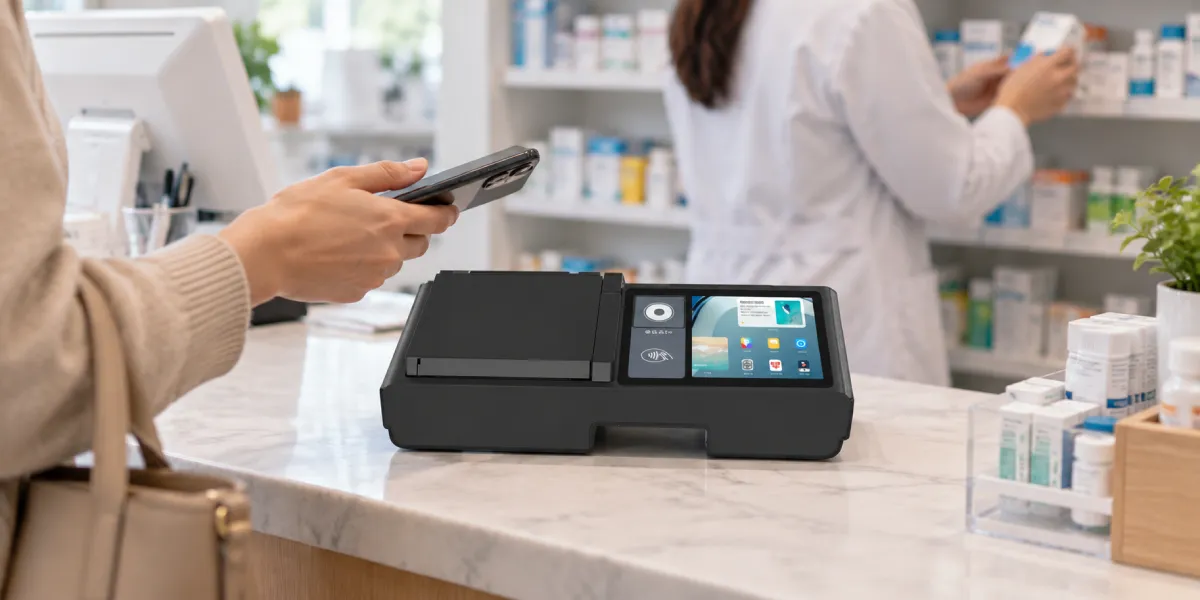
Dual-screen hardware is useful at this point because it separates staff controls from patient-facing information. The cashier can navigate billing records on the main display while the second display presents the amount for review without exposing unrelated patient data.
Price information should be clear before the patient selects a payment method. In the United States, CMS began enforcing updated 2026 Hospital Price Transparency requirements on April 1, 2026. The CMS hospital transparency program requires accessible standard-charge information, but CMS also explains that a standard charge is not automatically the patient’s final out-of-pocket amount.
Portable payment collection prevents every patient from returning to a central cashier. A handheld terminal can support home visits, ward discharge, mobile clinics or consultation-room payment when the healthcare application can retrieve the correct account securely.
The mobile workflow needs clear staff authentication, device assignment and receipt handling. The terminal should never rely on staff typing a patient name alone when two people can share similar names.
Hospital pharmacies combine medical billing with retail-style checkout. A transaction may include prescription charges, insurance allocation, non-prescription products and a remaining patient co-payment.
The pharmacy application must keep dispensing, inventory and payment records aligned. For more operational detail, a guide to specialized pharmacy POS systems explains why barcode, medicine and inventory workflows extend beyond ordinary checkout.
Post-visit collection handles balances that could not be finalized at the point of care. The hospital can issue a digital invoice, payment link or portal notification after insurer adjudication or final charge review.
The system should post remote payments to the same patient ledger used by the cashier. Creating a separate online-payment list forces finance staff to match transactions manually and increases the risk of contacting a patient who has already paid.
A practical healthcare payment system supports several payment routes because patient circumstances differ. A digitally confident outpatient, an elderly inpatient and a family member paying remotely may each need a different method.
| Payment method | Strongest healthcare use | Operational requirement |
|---|---|---|
| Cash | Walk-in clinics and patients without digital access | Shift control, change management and cash reconciliation |
| Contact or contactless card | General cashier and clinic checkout | Acquirer connection, certified payment application and refund workflow |
| Mobile wallet | Fast payment for smartphone users | NFC or supported wallet acceptance |
| QR payment | Markets with bank or wallet QR networks | Clear pending/confirmed status and reference matching |
| Payment link or portal | Advance deposits and post-visit balances | Patient authentication and automatic posting to the account |
| Palm-vein payment | Enrolled patients seeking cardless, contactless checkout | Enrollment, identity mapping, payment credential connection and fallback |
Fallback is part of an inclusive payment design. A patient who cannot use a phone, card or biometric option still needs a supported route. Cash, staffed assistance and alternative electronic methods should remain available according to the facility’s operating model.
Palm-vein payment connects an enrolled palm template to a patient identity and an approved payment account. The patient holds a hand above the sensor, the system finds the matching identity, retrieves the amount due and sends the payment request through the configured payment service.

The practical workflow has four stages:
The distinction between recognition and payment matters.
Palm-vein recognition identifies an enrolled patient; the payment processor authorizes the transaction. The biometric terminal does not replace the hospital billing system, acquiring service or patient ledger. The integrated workflow uses biometric identity to reduce account lookup and card presentation while preserving normal payment authorization and reconciliation.
Palm payment is most useful for repeat outpatient visits, hospital memberships, regular therapy, chronic-care programs and staff facilities where enrollment can support repeated use. A one-time emergency visitor may find a contactless card or assisted cashier route more practical.
ZCS provides three palm-vein terminal formats for healthcare integrators building their own billing and payment applications. Z90NP focuses on certified payment hardware, Z108P adds a larger dual-screen experience, and Z92P supports portable identity and collection workflows.
| ZCS model | Healthcare role | Key hardware fit |
|---|---|---|
| Z90NP | Cashier payment and cardless palm payment | Payment interfaces, 58 mm printer, 5.5-inch display and palm-vein recognition |
| Z108P | Registration desk, fixed cashier or guided enrollment | 8-inch display, dual-screen same/different display and palm-vein recognition |
| Z92P | Consultation room, ward, mobile clinic or home visit | Portable 5.5-inch design, palm and face recognition, 10,000-template capacity |
Z90NP combines palm-vein recognition with the payment functions required at a hospital or clinic cashier. The Z90NP palm payment POS runs Android 15 with 4GB RAM and 32GB storage, and includes a 58 mm thermal printer operating at 80 mm per second.
Z90NP supports contact cards, magnetic-stripe cards and 13.56 MHz contactless cards. Its certifications include PCI PTS 5.x, EMV Contact Terminal L1 and L2, EMV Contactless Terminal L1, PayWave and PayPass. The palm module supports a 6–20 cm presentation distance and server-side matching against 1:1,000,000 identities in under one second.
The combined format lets a healthcare integrator offer palm payment, card payment and printed receipts through one cashier application. Z90NP suits outpatient registration desks, specialist clinics, diagnostic centers and hospital pharmacies where payment acceptance is the primary task.
Z108P separates staff operation from patient-facing payment information. The main 8-inch display gives the cashier room to navigate patient billing, while the second display supports mirrored content or different content controlled by the application.
The dual-screen workflow can show the patient an amount, selected services, payment instructions or completion message while the cashier retains the operational interface. Privacy-aware software should display only the information required for the transaction instead of duplicating the full patient record.
The Z108P palm-vein terminal runs Android 14 Go, supports 3GB or 4GB RAM and up to 64GB storage, and uses server-side palm matching against 1:1,000,000 identities in under one second. Optional face recognition, QR scanning and NFC expand the available healthcare workflows.
Z108P fits registration counters, fixed payment desks and guided enrollment stations. The larger display also helps applications provide clearer palm-positioning prompts and payment confirmation.
Z92P brings palm and face recognition into a compact handheld format. The terminal uses a 5.5-inch display, Android 13 Go, dual-band Wi-Fi, Bluetooth 5.0 and a 3020 mAh battery.
Z92P supports a palm-vein capacity of 10,000 templates, 1:N matching in under one second and a 5–20 cm palm presentation distance. Healthcare software can use the device for patient identification, bill retrieval, mobile collection records and confirmation during ward, consultation-room or home-visit workflows.
The payment route still depends on the configured healthcare application and payment service. Z92P is the portable option when mobility and biometric identity matter more than an integrated receipt printer or full payment-card certification set.
Hospital payment integration should pass structured transaction data instead of relying on staff to re-enter amounts. The billing system should send the patient-account reference, invoice reference, amount, currency and permitted payment actions to the collection application.
Card payment integration should keep account data inside a controlled payment environment. The PCI DSS requirements apply to entities that store, process or transmit cardholder data or can affect the cardholder-data environment. The healthcare application can exchange transaction references and results without exposing clinical systems to unnecessary card data.
The payment application should return at least:
Status handling needs more detail than “success” or “failure.” A timeout may leave the payment outcome unknown. A reversal cancels an authorization. A refund returns money after a completed transaction. The cashier interface should tell staff whether to retry, wait, check the processor or start a refund.
Reconciliation then compares three records: the patient ledger, the payment-provider report and the bank payout. The daily process should expose missing postings, duplicate attempts, partial payments, refunds, processor fees and cash differences before finance closes the period.
Healthcare payment systems handle both financial data and information connected to patient care. The application should limit each screen, receipt, log and staff role to the data required for the payment task.
In the United States, HHS explains that HIPAA “payment” activities include billing, collection, eligibility, coverage and claim-related work. The official HIPAA payment guidance permits relevant uses and disclosures with defined limits and protections. Healthcare providers in other markets need to map the same workflow to their national privacy and health-data rules.
Card-data controls remain separate from clinical-data permissions. The healthcare organization controls access to patient and billing records, while the payment application controls payment-account data, authorization messages and processor references.
Price clarity should continue from estimate to final receipt. The cashier screen should label estimates, deposits, insurer-pending amounts and final patient balances accurately. A dual-screen terminal can improve visibility only when the underlying billing status is correct.
A successful rollout begins with one payment journey, not a facility-wide hardware order. A clinic can start with consultation fees at reception; a hospital can start with outpatient deposits or pharmacy co-payments.
Payment-terminal approval should be checked against the exact model and configuration selected for the project. The guide to PCI PTS verification shows procurement teams how to confirm approval records before deployment.
Use this sequence:
The best healthcare payment solution is the one that keeps patient billing and payment records synchronized. Cards, QR codes, portals and palm-vein terminals are collection tools; the operational result depends on accurate balances, clear patient communication and complete reconciliation.

Healthcare payment solutions calculate, present, collect and record patient payments. They connect hospital or clinic billing software with cashiers, online portals, payment terminals, processors, receipts and reconciliation records.
A hospital payment system determines and records the patient balance, while a payment terminal captures a selected payment method. The terminal needs an integration that posts the payment result to the correct patient account.
Palm-vein recognition identifies an enrolled patient, but a payment service still authorizes and processes the transaction. The complete workflow links the biometric identity, patient bill and approved funding source.
Z90NP fits cashier payment because it combines palm-vein recognition, payment-card interfaces, a receipt printer and payment certifications. Z108P fits dual-screen billing review, while Z92P fits portable patient identification and collection workflows.
The clinic should check the returned transaction status before retrying. A decline, timeout, pending payment and reversal require different actions, and the cashier should preserve the original patient-account reference throughout the check.






 Home
 How to Evaluate a Palm Biometric Terminal Supplier for Payment, Access and Attendance Projects?

