
2026-09-04 Author : ZCS
Key Takeaways
● A bus ticketing POS terminal combines fare calculation, ticket issuance, payment acceptance, validation, printing, and trip data capture in one mobile workflow.
● Handheld bus ticketing machines need cellular connectivity, offline transaction handling, fast thermal printing, GPS, and enough battery capacity for conductor shifts.
● Open-loop NFC transit payments require payment-specific certification; Google Wallet currently requires EMVCo Level 1 and Level 2 certification for transit terminals.
● ZCS Z92 combines Android 13, dual SIM, 58mm printing, GPS, optional NFC/PSAM, QR scanning, and a 7.4V 3020mAh battery in a 364g handheld body.
A bus ticketing POS terminal is not a smaller version of a retail cash register. A conductor or driver may need to select a route, calculate a fare, accept cash or digital payment, validate an NFC card or QR code, print a ticket, store the transaction, and synchronize it with a central system while the vehicle is moving. For the broader hardware-and-software concept, see ZCS's POS ticketing system guide.
Bus ticketing hardware sits at the edge of an automatic fare collection system. A handheld electronic ticketing machine serves conductors and inspectors, a fixed validator serves passengers at a door or gate, and a ticket vending machine handles self-service purchases. The hardware may overlap, but the workflow, ergonomics, payment logic, and software responsibilities are different.
A bus ticketing POS terminal is a handheld electronic ticketing machine used by drivers, conductors, or inspectors to sell, validate, and print public-transport tickets while recording fare and trip data. Typical hardware combines Android, cellular connectivity, thermal printing, NFC or QR reading, GPS, and local storage for mobile operation.
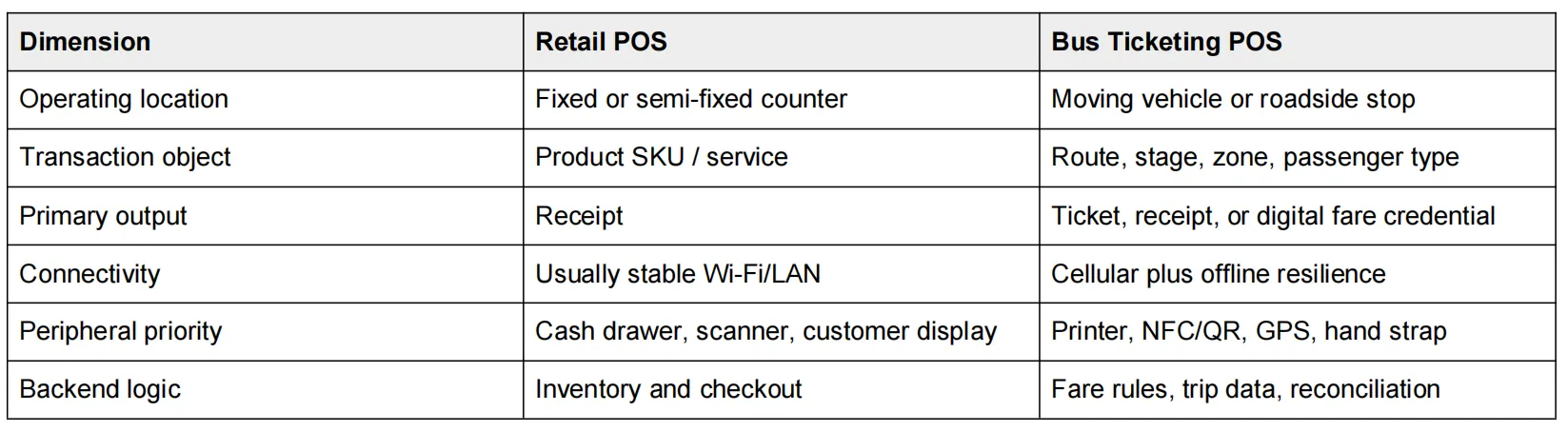
The most important difference is that the operator is moving with the device. A bus conductor POS machine must remain usable when the vehicle vibrates, when a queue forms at a stop, and when cellular coverage drops between towns. Screen size, weight, printer access, hand grip, battery behavior, and network recovery therefore matter more than they do at a fixed checkout counter.
A typical onboard transaction follows six steps. The conductor logs in, selects the route or trip, chooses the passenger fare, accepts payment or validates a credential, issues a printed or digital ticket, and then sends the transaction to the fare-management backend. Software can calculate zone or stage pricing, but the terminal must expose the hardware interfaces that software needs.
2.1.Android OS and an accessible SDK
Android matters because public-transport projects rarely use a generic retail application. An Android bus ticketing terminal usually runs a customized fare application that handles route tables, conductor accounts, ticket templates, NFC or QR logic, and backend synchronization. The practical buying question is therefore whether the vendor exposes reliable printer, NFC, scanner, camera, GPS, PSAM, and device-management APIs. ZCS explains this development model in its Android POS SDK and ODM guide.
2.2.4G, Wi-Fi, and offline transaction recovery
Continuous internet access should never be assumed on a bus route. Rural roads, tunnels, dense urban corridors, and carrier handovers can all interrupt connectivity. A resilient ticketing application should cache the necessary transaction data locally, identify unsynchronized records, retry safely after reconnection, and prevent the same fare from being posted twice.
Offline-capable bus ticketing depends on both hardware and software. Multi-band cellular radios, dual-SIM options, onboard storage, and battery capacity keep the terminal available, while the fare application must queue transactions, preserve sequence integrity, reconnect automatically, prevent duplicates, and reconcile delayed records with the central backend.
This is the same reason that an offline-capable device should be tested on an actual route rather than on office Wi-Fi. ZCS's guide to offline Android POS deployments makes the useful distinction that there is no single “offline chip”; resilience comes from storage, connectivity, battery, and application behavior working together.
2.3.Integrated mobile ticket printer
An integrated printer removes a second device from the conductor workflow. A separate Bluetooth printer adds another battery, pairing state, charging cable, and failure point. For routes that still issue paper tickets, a built-in 58mm thermal printer lets one handheld device handle fare entry, payment, and printing. Procurement should also check roll diameter, paper availability, print-head servicing, paper-jam recovery, and reprint logic.
2.4.NFC for closed-loop and open-loop fare collection
NFC bus ticketing terminals can support two very different payment models. Closed-loop systems use an operator-issued transit card or stored-value credential, often based on technologies such as MIFARE. Open-loop systems accept contactless bank cards or mobile wallets directly. A reader that can detect an NFC tag is not automatically certified to accept open-loop bank-card payments.
Open-loop transit acceptance requires payment-specific compliance beyond basic NFC support. Google Wallet's Open Loop Transit documentation, updated in August 2026, requires EMVCo Level 1 and Level 2 certification and recommends Offline Data Authentication for terminals that must process fast taps when network connectivity is intermittent.
For buyers planning bank-card or mobile-wallet fare acceptance, certification must be validated at the project level. Google's open-loop transit prerequisites specify EMV L1/L2, while the basic functionality requirements explain Offline Data Authentication for low-latency taps when a transit terminal is intermittently offline.
2.5.QR and barcode scanning
QR support gives operators a second credential path beside NFC. A bus may need to validate a mobile ticket displayed on a phone, scan a printed QR code, check an inspector credential, or read a passenger pass issued by another sales channel. The scanner should be tested under glare, low light, scratched screens, and vehicle motion rather than only with a perfect desktop test code.
Battery capacity should be evaluated as energy and workload, not as an isolated mAh number. A 7.4V 3020mAh pack contains about 22.3Wh of nominal energy, but actual runtime depends on screen brightness, cellular signal strength, printer duty cycle, NFC polling, GPS use, and the ticketing application. A public-transport buyer should therefore run a full-shift route test with realistic printing and network conditions.
GPS can support more than navigation. When software uses location data, a transit operator can associate ticket issuance with a route segment, verify trip progress, audit conductor activity, or trigger location-based fare logic. Dual SIM can also give a project more carrier flexibility, although failover behavior still depends on modem configuration and application/network policy.
A 500-terminal rollout becomes an IT fleet, not a collection of individual handhelds. The operator should be able to inventory devices, control application versions, push updates, configure settings, retrieve diagnostic information, and lock or recover units remotely. TMS capability becomes especially valuable when buses operate from multiple depots and returning every terminal to headquarters is impractical.
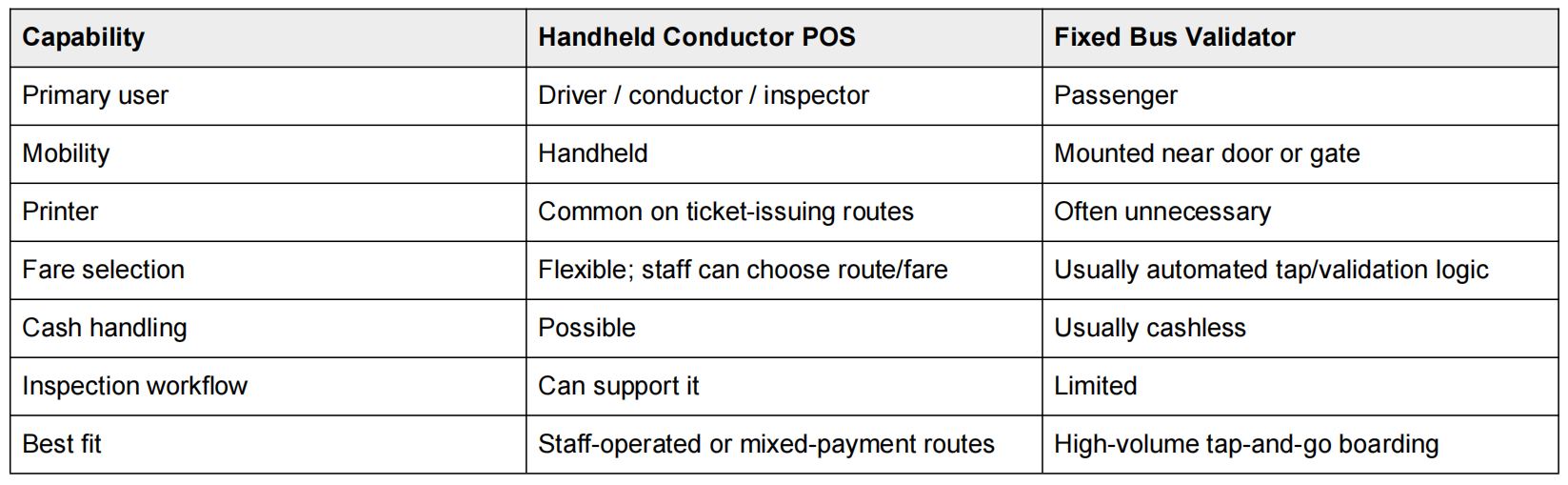
The operating model should decide the hardware, not the other way around. High-volume urban networks with all-door boarding may favor fixed validators because passengers can tap without conductor interaction. Regional buses, cash-accepting routes, intercity services, or systems that require flexible fare selection often benefit from a handheld electronic ticketing machine carried by staff.
4. What Payment Methods Should a POS Machine for Public Transport Support?
Public transport rarely has one universal payment method. A project may need cash for inclusion, closed-loop transit cards for frequent riders, QR tickets sold through an app, and open-loop contactless payment for passengers using bank cards or mobile wallets. The hardware should be configured around the operator's actual fare architecture instead of assuming that “NFC” means every payment type is automatically covered.
● Cash: still relevant where bank-card penetration or network availability is uneven.
● Closed-loop transit card: supports operator-issued stored value, passes, concessions, and local fare rules.
● QR ticket: useful for app tickets, web purchases, printed passes, and inspection workflows.
● Open-loop contactless: lets riders tap compatible bank cards or mobile wallets when the payment stack is certified and integrated.
● Local digital payments: mobile money or country-specific payment schemes may require additional software and certification.
Open-loop transit also reaches beyond the handheld device. EMVCo maintains a Transit Operator ID process for public or quasi-public transport operators accepting EMV contactless transactions, illustrating that transit payment deployments involve terminal, operator, processor, and backend responsibilities rather than a standalone NFC reader.EMVCo Transit Operator ID
ZCS Z92 fits the physical profile of a handheld bus ticketing terminal, but the hardware should not be confused with a complete fare system. The configuration used in this guide runs ZOS based on Android 13.0 with a quad-core 2.0GHz processor, 2GB/3GB RAM plus 16GB/32GB storage, a 5.5-inch 720 x 1280 touchscreen, dual SIM, GPS, 58mm printing, optional NFC/PSAM, and QR scanning. ZCS currently lists transportation and ticketing among the Z92 application scenarios on the Z92 product page.
ZCS Z92 is a handheld Android POS hardware platform for transportation and ticketing applications, combining Android 13, 2G/3G/4G connectivity, dual SIM, GPS, a 58mm thermal printer, optional NFC/PSAM, QR scanning, and a 7.4V 3020mAh battery in a 364g enclosure.

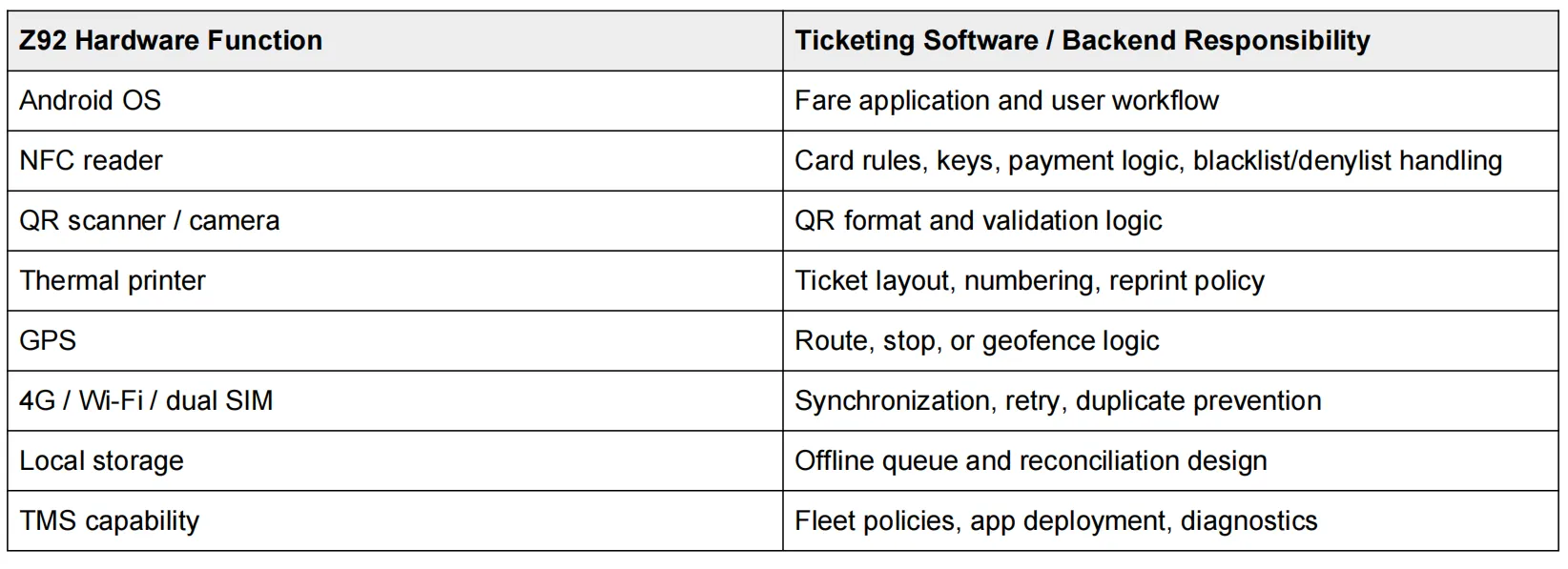
The edge-device distinction prevents one of the most common procurement mistakes. A terminal can contain the right printer, NFC reader, modem, GPS receiver, and scanner while still lacking the route database, fare engine, account-based ticketing logic, clearing rules, or operator dashboard required by the transport authority. Those functions belong to the application and backend.
A sample should be tested inside a moving bus before the final order is released. Laboratory tests are useful for interfaces and certification, but they do not reproduce vibration, sun glare, conductor handling, weak cellular coverage, repeated printing, or the boarding pressure of a real route.
● Run a complete conductor shift with realistic screen brightness, 4G usage, GPS, scanning, NFC activity, and ticket printing.
● Force the terminal offline during a transaction, then verify queued data, reconnection, retry behavior, duplicate prevention, and backend reconciliation.
● Print hundreds of tickets and check heat, paper jams, roll replacement speed, print clarity, and remaining battery capacity.
● Test NFC and QR while passengers are boarding quickly, including scratched cards, bright screens, low-light codes, and imperfect tap positions.
● Push an application update through the intended TMS or management process and confirm that failed updates can be diagnosed remotely.
● Confirm spare parts and accessories such as printer components, batteries, hand straps, silicone cases, bases, chargers, and replacement cables.
The final purchase specification should include acceptance criteria, not just feature names. “Supports 4G” is weaker than a measured reconnection requirement. “Has a printer” is weaker than a defined ticket volume and roll-change test. “Supports NFC” is weaker than naming the required card technology, certification, transaction model, and target tap performance.

● Confirm whether the deployment needs a handheld conductor POS, fixed validator, or both.
● Define fare logic: route, stage, zone, distance, concessions, passes, and fare caps.
● Confirm Android version, SDK access, and required printer/NFC/scanner/GPS APIs.
● Match 2G/3G/4G bands and SIM architecture to the deployment country and carriers.
● Define offline storage, retry, duplicate-prevention, and reconciliation behavior.
● Specify the payment model: cash, closed-loop NFC, QR, open-loop EMV, or local digital payment.
● Test ticket printer paper size, duty cycle, replacement procedure, and spare-part availability.
● Run full-shift battery testing with actual printing, GPS, scanning, and network conditions.
● Verify TMS, OTA update, device inventory, configuration, and remote-diagnostic requirements.
● Complete a pilot batch on live routes before scaling to hundreds or thousands of terminals.
A bus ticketing POS terminal is a handheld electronic ticketing machine used to calculate fares, accept or validate payment, issue tickets, and record trip transactions. It normally works as an edge device connected to a fare-management application and backend.
Yes. Android provides a flexible platform for fare applications, but the terminal must expose the required printer, NFC, QR, GPS, cellular, and security interfaces. The bus operator or integrator still needs ticketing software and backend logic.
No. A well-designed system should tolerate temporary network loss. The application must define what can be performed offline, how records are queued, how they are synchronized later, and how duplicate transactions are prevented.
Not every project needs NFC. Cash-and-paper routes or QR-only deployments may not use it. Closed-loop transit cards and open-loop contactless bank-card acceptance, however, require NFC hardware plus the appropriate software, keys, certification, and payment integration.
Yes. Models with an integrated thermal printer can issue paper tickets or receipts directly. The ZCS Z92 configuration discussed here uses 58mm paper with a maximum roll diameter of 40mm.
The Z92 has hardware relevant to ticketing - Android 13, cellular connectivity, GPS, a 58mm printer, optional NFC/PSAM, QR scanning, and dual SIM. A complete deployment still requires fare software, backend integration, project-specific payment compliance, and live-route validation.
Procurement bottom line: choose the bus workflow and fare architecture first, then specify the handheld hardware around that workflow. The strongest bus ticketing POS terminal is not the device with the longest feature list; it is the device whose printer, connectivity, NFC/QR interfaces, battery, SDK, and fleet-management model remain usable across the operator's actual routes.






 Home
Home  Android POS Hardware for Fuel Attendants: What Petrol Stations Need for Pay-at-Vehicle Checkout
