2026-09-18 Author : ZCS
A POS terminal for postal and parcel collection services must coordinate shipment intake, service pricing, customer confirmation, payment and the first tracking event. The counter clerk may accept a prepaid parcel, calculate a service charge, sell packaging, collect customs or COD-related fees and print documents within the same visit. If those actions happen in disconnected systems, staff re-enter data and customers wait longer.
Hardware cannot calculate postage or create a carrier tracking record by itself. The postal or logistics application provides rating, address validation, service rules and tracking integration. The POS terminal should give that application reliable input, a clear screen, payment and printing interfaces, and network access suited to the site.
For last-mile payment and proof-of-delivery requirements, see Android POS hardware for courier drivers. Collection counters and delivery routes can share parcel identifiers, which makes a consistent data model especially valuable.
2.Start with the Collection Service Catalogue
List the services offered at each outlet: domestic parcel acceptance, international post, return drop-off, prepaid label scanning, packaging sales, bill payment, money services or third-party marketplace collection. Each service has different identity, weight, address, payment and document requirements. A small partner shop may need only scan-and-receipt functions, while a post office may need a larger counter interface and several peripherals.
Define the authoritative system for price and tracking. Staff should not manually type a price calculated elsewhere or create a tracking number that the carrier does not recognize. The application should retrieve the service, show the amount and only commit the acceptance event after required checks are complete.
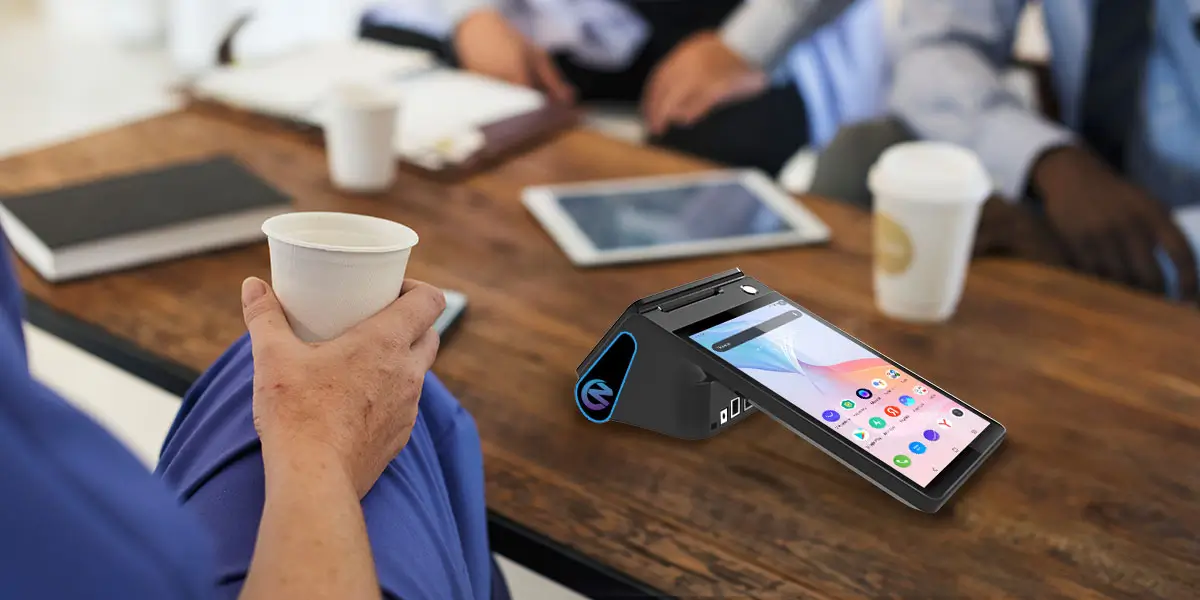
The terminal should scan the one-dimensional and two-dimensional codes used on carrier labels, return codes and customer phones. A successful beep is not enough; the application should validate format, detect duplicates and show the destination or service record for confirmation. Test creased, glossy and partially damaged labels under typical counter lighting.
International or regulated services may require an address, declaration, sender identity or supporting document. A camera can capture an image, but it does not validate authenticity. Use an approved identity or document service where required, minimize the data displayed to clerks and avoid storing unnecessary document images on the terminal.
4.Weight, Dimensions and External Peripherals
Postage often depends on weight, dimensions, destination and service level. A POS terminal may connect to a scale through USB, Bluetooth or another supported interface, but compatibility must be tested with the exact scale and Android application. The application should record the measured value and flag weights outside the scale's approved range.
Dimensioning equipment, label printers, cash drawers and customer PIN pads may also be needed. Document every port and protocol before choosing a terminal. A device with several connectors is not automatically compatible with each peripheral, and adapters can create an unreliable counter setup if power and drivers are not planned.

A customer display can show the selected service, destination summary, price, fee and payment QR while the clerk uses the main screen. This is useful when several delivery speeds or optional services are offered. The customer can identify a wrong parcel count or amount before payment rather than discovering the error on the receipt.
Display only the information needed for confirmation. Full addresses, telephone numbers and identification details should not be exposed to the queue. The application can mask personal data while still showing enough context for the customer to recognize the transaction.
6.Payments, Receipts and Labels
Postal counters may accept cash, cards, wallets, account payments or prepaid shipment codes. Each method should resolve to a single sale record and carrier acceptance record. When the payment succeeds but label creation fails, staff need a recovery path that reprints or resumes the original shipment without charging again.
Receipt printing and shipping-label printing are different requirements. Receipts summarize the sale; labels may need adhesive stock, barcodes and a specified layout. Confirm whether the chosen printer supports the required media. If a dedicated label printer is used, test its connection, driver and error reporting with the terminal.
The ZCS Z108S Smart Mobile Terminal is designed for service points where the operator and customer both need a clear view of the transaction. Staff can use the 8-inch main screen to check the parcel, destination and service level, while the optional 3.95-inch or 2.6-inch secondary screen presents the amount, payment QR code or confirmation prompt to the sender. This dual-screen layout can reduce verbal misunderstandings at a busy postal counter.
An optional barcode scanner supports prepaid drop-offs and parcel intake, while the 58mm or 80mm printer can handle counter receipts according to the selected configuration. Ethernet suits a permanent post office, and 4G supports partner shops or temporary collection points. These features should be integrated with the postal application, rating service and any dedicated shipping-label printer or approved scale required by the workflow.
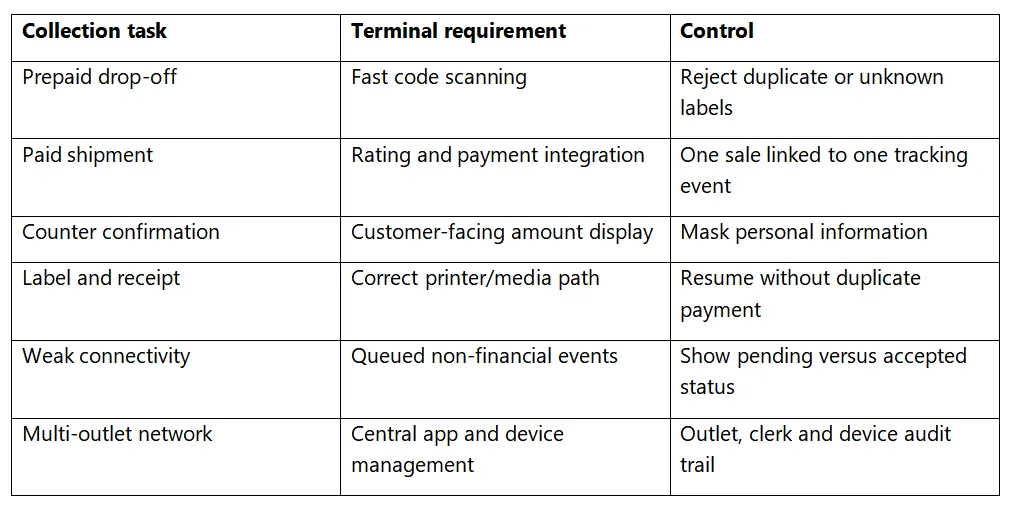
A collection point may continue capturing limited shipment information during a network interruption, but the operator should not promise acceptance that the carrier has not confirmed. The application should state which services can be queued, how long records remain valid and when a parcel may enter the transport network. High-risk or international services may need to stop until required checks return.
Every request should carry a unique identifier so a retry does not create a second shipment or charge. A status-enquiry function should retrieve the result of the original request. Pending items need a visible work queue and supervisory follow-up rather than being hidden after the customer leaves.
Use individual clerk accounts and role-based access. A partner outlet may be allowed to accept prepaid returns but not issue refunds or alter service prices. Supervisor actions should require separate credentials, and each cancellation, reprint and manual override should be logged.
Central device management can distribute the postal application, group settings by outlet type, record versions and disable lost equipment. Keep operational device logs separate from shipment and payment ledgers. The carrier system should remain authoritative for tracking, while the finance platform remains authoritative for settlement.
The physical counter affects transaction quality. Position the main display so the clerk can scan and type without twisting, and place the secondary display where the customer can confirm the service without seeing the previous customer's data. Cables, scale platforms and paper paths should remain clear of parcel movement. The terminal should recover cleanly after paper replacement or a peripheral is disconnected.
Use readable text, clear focus states and simple prompts for both staff and customers. Audio alone should not be the only error signal. When the customer must approve an amount or service, provide enough time and an accessible alternative. Multilingual sites should test address entry, names, receipts and labels in every supported script rather than translating only the menu.
Close the outlet by comparing accepted parcels, labels issued, payments, cash, electronic settlements, cancellations, refunds and unused or voided label ranges. The number of parcels should reconcile with the first carrier tracking events. A difference may indicate a payment issue, an unmanifested parcel or a label that was printed but never attached.
Restrict price overrides, free services, label reprints and tracking-number replacement. High-risk actions can require a supervisor or central approval. Reports should identify repeated voids and reprints by clerk and device without assuming that every exception is fraud. Operations teams need the underlying parcel and payment references to investigate fairly.
Build a pilot counter with the final terminal, scanner, scale, printer, cash drawer and network. Process prepaid parcels, paid shipments, returns, voids, reprints and network failures. Include long addresses, international characters and damaged labels. Measure transaction time, scan failure, label failure, payment uncertainty and the number of staff interventions.
A successful pilot should also close the day. Compare sales totals, cash, electronic settlements, accepted parcels, cancelled labels and unresolved events. If these reports cannot be reconciled, adding more outlets will multiply the problem.

Q1.Can the Z108S scan parcel barcodes?
A barcode scanner is available as an option. Confirm the supported symbologies and test it with real carrier labels before rollout.
Q2.Can a POS terminal calculate postage?
The Android terminal runs the postal application, but the carrier or postal rating service supplies the rules and prices.
Q3.Can the built-in printer produce shipping labels?
Only when the ordered printer and media meet the label specification. Many deployments use a separate compatible label printer.
Q4.What happens if payment succeeds but label creation fails?
The system should query the original payment and shipment request, then resume or reprint without creating a second charge.
Q5.Why use a customer-facing screen?
It lets the sender confirm service and amount while reducing exposure of unnecessary personal data when the application is designed correctly.
A postal POS succeeds when the parcel, price, payment, label and first tracking event remain connected. Choose hardware that makes those steps clear to staff and customers, then validate every peripheral and exception in a realistic counter pilot. The result is faster intake and a cleaner audit trail across the network.






 Home
 Walmart Finally Adds Tap to Pay: What It Means for Retail POS

