
2026-09-29 Author : ZCS
A tax server becomes unreachable during a sale. The merchant still needs to serve the customer, preserve transaction data and issue whatever document the jurisdiction allows. Yet the POS cannot assume that every locally printed receipt is already a valid fiscal document. The result depends on the country’s fiscal architecture, the approved device or software and the outage procedure defined by the tax authority.
Fiscal POS offline mode is the controlled process for recording a transaction when the terminal cannot complete its normal exchange with the tax system. A compliant design protects the record locally, assigns a traceable status, prevents editing or duplicate issuance and transmits the required data after connectivity returns. Some regimes permit deferred submission; others require contingency invoices, pre-authorized numbering or a different fallback channel.
The terminology and architecture are explained in the fiscal POS machine guide. An EFD with protected fiscal memory, a virtual fiscal device and a real-time invoice-clearance system may all react differently to the same network outage.
The terminal may lose its local network, the fiscal middleware may fail, the tax authority may reject the connection, or the authority’s service may be unavailable. A payment can also succeed while fiscal reporting fails, because the acquiring host and tax platform are separate systems. The application should expose those states instead of presenting one generic ‘offline’ message.
Before placing a sale in an offline queue, the software should determine whether the request reached the fiscal service. If the server accepted the record but the acknowledgement was lost, resubmitting it as a new invoice can create duplicates. Status enquiry, a deterministic document identifier and idempotent server behavior are therefore as important as local storage.

The local record normally includes seller and location identity, terminal or fiscal-device identifier, document number, date and time, line items, tax categories, totals, payment method and the application’s current submission state. Country rules may require a signature, verification code, fiscal counter or protected memory entry. The exact fields must come from the relevant authority specification.
The need for protected records is what separates fiscal POS hardware from a standard receipt terminal. Local storage capacity alone does not create fiscal compliance; the jurisdiction may require sealed memory, a certified security module, signed records or approved fiscal software.
Queued records should be encrypted and protected against deletion, renumbering and silent modification. The application needs enough space for the permitted outage window and a warning before the queue or protected memory reaches its limit. Clock changes, reboot and battery depletion must not alter document order.
There is no universal answer. Some systems allow invoices to be created during an internet outage and sent later. Others require an emergency series, a manual document or an authority portal. A clearance model may not treat an invoice as valid until the tax platform accepts it. The merchant’s procedure must therefore be configured by jurisdiction and taxpayer type.
Kenya’s tax authority states that its eTIMS Client and VSCU solutions can continue invoicing during internet downtime and transmit invoices after service returns, while the online portal offers a business-continuity alternative.
A customer-facing document should show the status allowed by the local regime. If the fiscal number or verification code is created locally under an approved method, the receipt can carry it. If the server must first clear the document, the POS may need to print a contingency notice or delay the final fiscal receipt. Calling every printout a tax invoice creates audit and customer-credit problems.
Reprints should retain the original identifier and be marked as copies. A paper jam must not cause the software to create a second fiscal sale. The printing process should be linked to the stored transaction so the terminal can reprint the same record after recovery without changing fiscal counters or totals.
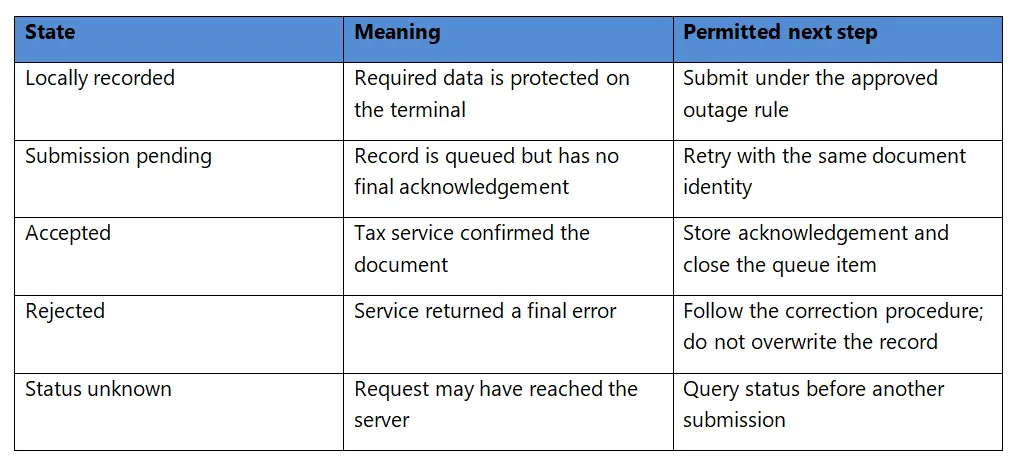
The queue should use controlled backoff rather than sending every stored document at once when service returns. It must preserve original sequence where the regime requires it, prevent simultaneous workers from transmitting the same record and retain both rejection details and later corrective actions for audit.
Each document should carry a stable identifier derived according to the approved system design. Reconnection sends the existing record with that identity, not a newly generated invoice. If the acknowledgement is lost again, the application checks status using the same identity. The backend returns the known result or safely accepts the first valid submission.
Conflicts require a defined correction path. If a document number already exists with different content, the software should stop and escalate instead of choosing the latest version. Credit notes, cancellation records or corrective invoices must follow local rules; deleting the queued sale is not an acceptable recovery method.
A general offline POS system may store a sale or payment request and synchronize it later. Fiscal offline mode adds legal recordkeeping, document status and tax reporting. The fact that a terminal can take cash or print while disconnected does not prove that the resulting document satisfies the fiscal regime.
Card authorization introduces another decision. A merchant may be allowed to record the fiscal sale locally while the payment application refuses offline card authorization, or the reverse may be technically possible under processor limits. The POS should keep payment status and fiscal status separate, then reconcile them so a successful payment cannot disappear from tax reporting.
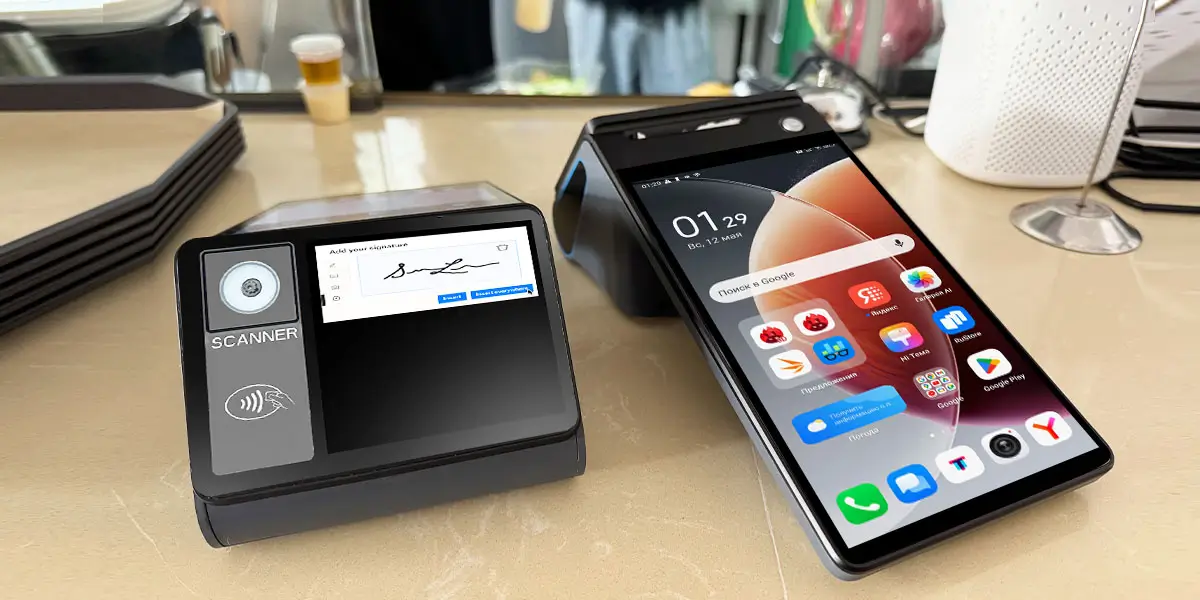
For counter and portable deployments, the ZCS Z108 Android POS provides an 8-inch main display, a 3.95-inch or 2.6-inch optional secondary display, integrated thermal printing, battery operation and wired or wireless connectivity. The customer-facing screen can show totals and receipt status while the operator manages the transaction on the main display.
The Z108 supports tax-control module integration through a reserved internal slot. ZCS can coordinate the hardware configuration with the buyer’s fiscal project, including the module’s installation space, electrical interface, power requirements and enclosure fit. This gives banks, retailers, distributors and solution providers a flexible Android platform for country-specific fiscal deployments.
The buyer or local solution partner can combine the selected tax-control module with its fiscal application, tax-authority interface and required certification path. ZCS provides the corresponding terminal hardware support and project-level engineering coordination, allowing the completed solution to be configured around the rules of the target market.
During a pilot, the integration team should fill the offline queue, restart the device, exhaust printer paper, change networks and restore service while checking that document identities, tax totals and acknowledgements remain consistent. The Z108’s portable design supports mobile collection, while either secondary-screen option can present totals and receipt information at fixed counters.
A terminal management system can report device health, deploy approved applications and identify outdated software, but updates must respect the certified fiscal configuration. An emergency remote change that modifies fiscal logic or security components may invalidate an approval or create inconsistent records across the fleet.
Operations teams should separate routine application content from controlled fiscal software, stage updates on test devices and preserve version history. The central dashboard should show terminals with growing offline queues, repeated rejection codes, clock problems or missing check-ins so support can act before a statutory reporting deadline is missed.

Cashiers need a short instruction that explains whether sales may continue, which receipt to issue and when to stop. Store managers need queue visibility and an escalation route. Tax or finance teams need the legal deadline and correction procedure. Technical support needs service status, logs and a safe way to retry records without changing their identity.
The playbook should distinguish a single terminal failure from a site-wide network outage and a tax-authority service incident. A local device fault may justify moving to an approved spare; a central outage may require a broader contingency process. Staff should never invent a receipt series or delete rejected records to make a dashboard appear clear.
After recovery, the manager verifies that queued counts reached zero or moved into documented exceptions, while finance compares POS totals, accepted fiscal documents and payments. Any gap remains open with an owner, reason and corrective document. This handoff turns technical reconnection into auditable business recovery.
The OECD Tax Administration 2025 report notes that more than half of surveyed administrations receive data from electronic fiscal devices or cash registers, with automatic transfer used by a majority of that group. Reliable outage recovery matters because electronic records increasingly feed compliance monitoring and audit systems.
An offline design should therefore preserve more than the merchant’s ability to trade. It must preserve the tax authority’s ability to verify completeness, ordering and integrity after delayed transmission. Queue monitoring, signed records and immutable audit trails help show that a network failure did not become an opportunity to omit sales.

Disconnect the terminal before submission, during transmission and after the server accepts a record but before the acknowledgement returns. Test a tax-server rejection after reconnection, a duplicate retry, a paper jam, a restart, low battery and a full queue. Confirm what the customer sees and what an auditor can reconstruct.
The pilot should measure maximum queue age, retry success, duplicate rate, unresolved records, time to recovery and accuracy of tax totals. Include multiple devices at one taxpayer location, because concurrent numbering and shared inventory can reveal conflicts that a single-terminal test misses.
Q1.Can a fiscal POS always issue receipts when the tax server is offline?
No. The permitted document and transmission deadline depend on the local fiscal regime and approved solution.
Q2.Is a printed offline receipt automatically a valid tax invoice?
No. Some systems require server clearance or a specific contingency format before the document has fiscal status.
Q3.How does the POS avoid duplicate invoices after reconnection?
It reuses a stable document identifier, checks status when acknowledgement is uncertain and makes retries idempotent.
Q4.How does the Z108 support fiscal projects?
The Z108 reserves an internal slot for a tax-control module, and ZCS can coordinate the terminal hardware configuration with the buyer’s selected module and project requirements.
Q5.What should buyers test on a Z108 fiscal project?
Test module integration, fiscal software, offline queue integrity, receipt workflow, reconnection, duplicate prevention and the certification path required in the target market.
A good fiscal offline mode does not hide an outage. It records the sale under a defined legal state, tells the merchant and customer what that state means, protects the document from alteration and completes reporting when service returns. With a reserved tax-control module slot, integrated printing and 3.95-inch or 2.6-inch secondary-screen options, the Z108 can be configured with the buyer’s fiscal solution for counter or mobile deployments. ZCS supports the terminal hardware and coordinates with the buyer’s project team throughout integration.






 Home
Home  Agent Banking Transaction Reversals After a POS Timeout
